
TL;DR
To analyse a competitor website, choose relevant search competitors, map their important pages and internal links, review keyword visibility, assess content, and inspect why other sites link to them. Compare promising findings with the client's existing site before recommending work. We recommend separating visible facts, tool estimates and hypotheses throughout. The finished output should be a short action list with evidence and verification checks, not a catalogue of everything competitors publish.
Competitor website analysis is a structured review of rival sites to identify useful improvements for your own. For an SEO agency, its value lies in connecting signals: a ranking guide, its supporting resources, the links it attracts and the route it offers towards a commercial page.
We will work through that wider assessment. Detailed keyword-gap exports and full technical audits remain separate tasks. Our goal is to decide which competitive patterns deserve investigation and what the client should do next.
Table of contents
- Before you start
- 1. Define the client decision and establish a baseline
- 2. Select search competitors for the same audience and task
- 3. Map site structure and inspect paths between pages
- 4. Examine keyword visibility at page and intent level
- 5. Evaluate content quality without treating rankings as proof
- 6. Inspect backlink patterns and why links exist
- 7. Separate observations, estimates and hypotheses
- 8. Prioritise client actions and define verification
- Agency handoff checklist
- Put one validated improvement into production
- Sources
- Recommended Reads
Before you start
Prepare a research workspace for one client and one commercial area. You need:
- The client's audience, offer, target country, language and conversion goal.
- An inventory of relevant client URLs, titles and page types.
- Authorised access to the client's Search Console and analytics, where available.
- A browser, spreadsheet and keyword/backlink data source.
- A crawler if you need a larger view of public page relationships.
A manual review can establish page content and navigation without a paid subscription. Do not claim complete competitor keyword or backlink coverage when your data cannot establish it. Record unavailable information as unknown.
Use public pages, respect access restrictions and crawl rules, and choose conservative crawl rates. Do not bypass logins or browser challenges, or submit fabricated enquiries to test a competitor's sales process.
Set shared spreadsheet fields before dividing the work: client, competitor, URL, page type, observation, source, date, market, confidence, client comparison and proposed action. Consistent evidence is more useful than identical-looking reports.
1. Define the client decision and establish a baseline
Start with the question the analysis must answer. A vague instruction to investigate competitors is too broad. A useful brief is:
Identify improvements that could help a UK payroll software provider attract small-business buyers researching a switch from spreadsheets.
This is an illustrative example, not a report about a real business. It gives us boundaries: UK search results, small-business needs, migration questions and relevant product pages. Enterprise procurement topics may be outside scope even if competitors rank for them.
List the client's existing pages serving that need. Record their roles, search visibility and available conversion measures. Note whether each page explains, compares, demonstrates or sells. A resource with few visits may still support an important buying decision.
For the search baseline, use the same country, device and comparison period throughout. In Search Console, selecting a query and opening the Pages tab shows which client URLs appeared for it. Google's Performance report guidance explains this workflow.
Your output: a scope statement, client page inventory and dated performance baseline.
If the inventory is incomplete, mark it provisional. Do not call a topic missing until you have checked relevant pages, rather than just titles. If analytics access is unavailable, keep conversion impact as a hypothesis instead of replacing it with a competitor traffic estimate.
2. Select search competitors for the same audience and task
Choose three to five sites as a practical starting sample, not a rule about the whole market. Search varied, relevant non-branded queries and record domains and individual pages that appear repeatedly.
For our payroll example, inspect searches about choosing payroll software, moving payroll records and completing a payroll migration checklist. These reveal different tasks, so the same competitor need not appear for all three.
Give each shortlisted site a role:
- Commercial competitor: serves a similar buyer with a competing offer.
- Informational competitor: answers relevant questions without necessarily selling a competing product.
- Specialist benchmark: provides a useful format or resource for one narrow task.
A publisher can be a valid content benchmark without being a sensible model for product architecture. A global software group may be relevant only within its UK small-business section.
Keep a reason for inclusion beside each domain. Repeated visibility for relevant migration searches is stronger justification than brand size. Record the search date and settings so colleagues understand the sample's limits.
Verification check: open the selected pages and confirm that their audience and purpose match the brief. A familiar brand is not enough.
If results contain unrelated industries or mostly enterprise pages, refine the queries or compare relevant subfolders. Do not let a whole-domain keyword footprint define the client's opportunity.
3. Map site structure and inspect paths between pages
Review each competitor's navigation, resource hubs, breadcrumbs, footer and publicly linked sitemap. Inspect representative relevant page types: a commercial page, a hub, several guides and any templates, tools or case studies connected to them.
Record the URL, title, main heading, page type, topic and visible links to other relevant pages. Follow links rather than inferring relationships from folder names. Two URLs under the same directory are not necessarily connected in the user journey.
We want to understand three things:
- Which pages introduce the subject?
- Which help the visitor complete a specific task?
- Where can that visitor go next?
A resource hub might link to a migration guide, checklist and case study. Those resources may offer contextual routes to a relevant product page. That is an observable structure, not proof that the links caused rankings or sales.
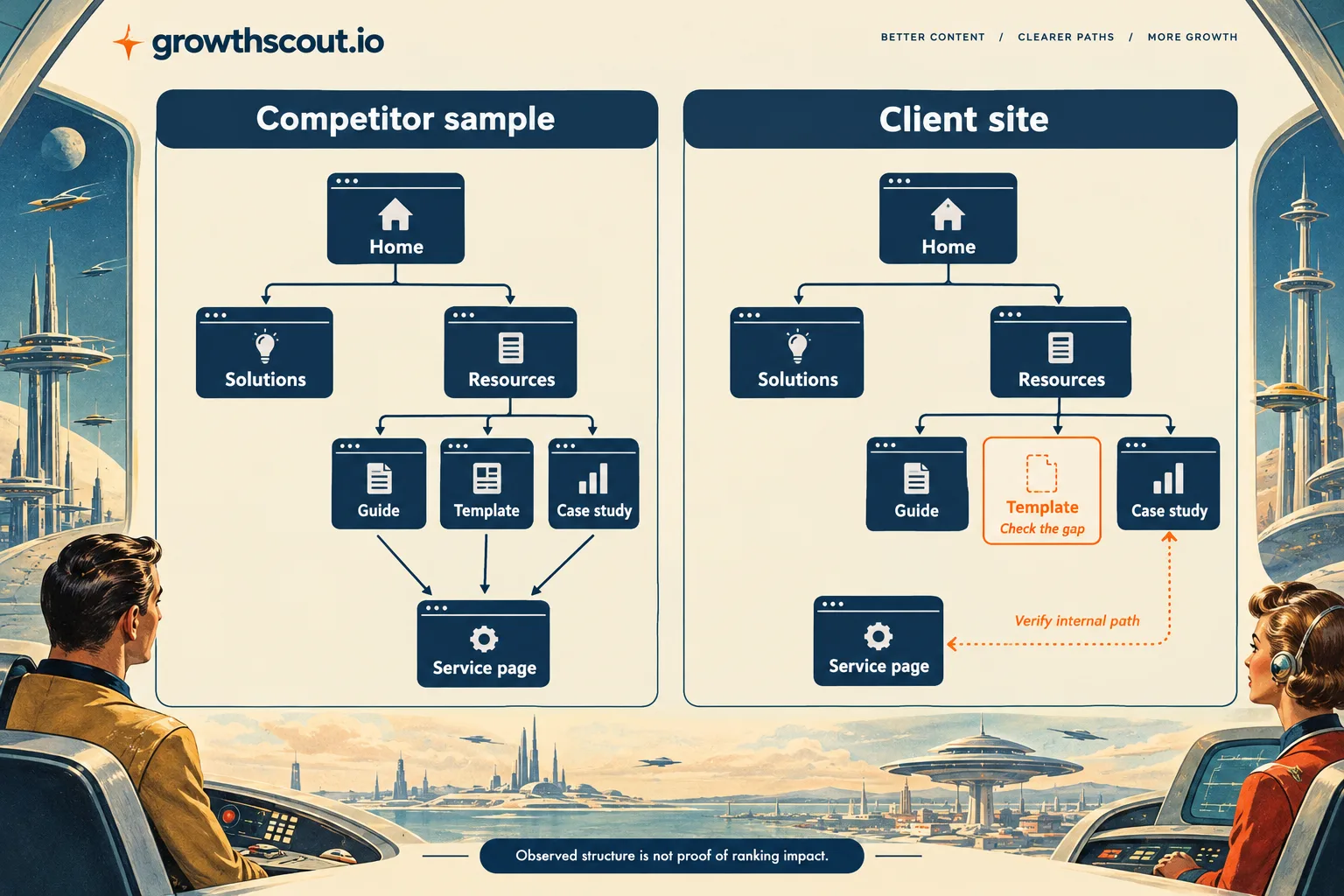
Google explains that links help it discover pages and understand relevance, and recommends contextual internal links with descriptive anchor text. Use Google's link best practices as a review standard, not a formula for copying a competitor's link count.
Your output: a compact map of page types, topic relationships and next-step paths.
If a crawler misses pages visible in navigation, investigate rendering, access rules and crawl limits before declaring them absent. Label partial crawls as partial. Keep technical observations bounded: a competitor inspection is not an owner-level audit, and one successful page load does not establish every template's health.
4. Examine keyword visibility at page and intent level
Use your keyword data source to identify relevant ranking URLs and associated query themes. Keep country, date and device settings aligned with the client baseline wherever the source supports those controls.
Begin with pages, not the longest possible keyword export. For each important competitor URL, capture:
- Its main query theme and apparent search intent.
- Observed or reported positions, with source and date.
- The page format: guide, product page, checklist or comparison.
- The closest client page addressing the same task.
Separate branded from non-branded queries. Competitor login searches are not automatically opportunities for your client. Distinguish commercially relevant education from broad informational traffic with little connection to the offer.
Treat estimated traffic as modelled visibility. Ahrefs calculates organic traffic estimates using ranking keywords, search volumes and estimated click-through rates. Its organic traffic methodology distinguishes these estimates from actual traffic. Do not present them as competitor analytics, leads or revenue.
Open current results for shortlisted topics and inspect the pages. Does the searcher need instructions, a reusable template or a purchase decision? A format mismatch may matter more than another keyword variation.
Your output: a visibility shortlist with a proposed client destination for each relevant intent.
If a topic seems missing, revisit the client inventory and query-to-page baseline. For deeper export, filtering and briefing work, use our keyword gap analysis guide rather than expanding this assessment into a second keyword research project.
5. Evaluate content quality without treating rankings as proof
Read shortlisted pages in full. Snippets and headings suggest where to look, but cannot establish whether a page resolves the reader's problem.
Use the same review questions for competitor and client pages:
| Dimension | What to inspect |
|---|---|
| Task completion | Can the reader understand, decide or act afterwards? |
| Evidence | Are claims supported by sources, examples or expertise? |
| Specificity | Does the page explain relevant constraints and trade-offs? |
| Usability | Is the useful answer easy to find and apply? |
| Distinct value | Does it contribute more than a generic summary? |
| Next step | Is the route onwards relevant to the reader's readiness? |
This draws on Google's people-first content guidance, which asks about originality, substantial value, expertise and whether readers can achieve their goal. It is a review framework, not a ranking score.
In our hypothetical payroll review, three guides might discuss migration while none provides a usable responsibility checklist. That suggests a format opportunity. It does not prove a new page is necessary: the client may already have a downloadable asset or a suitable guide that needs improvement.
Record concrete observations, such as a checklist naming the owner and required input for each task. Avoid concluding that it converts better without conversion evidence.
Your output: specific strengths, weaknesses and unanswered reader needs attached to URLs.
When accuracy exceeds the analyst's expertise, request specialist review. Mark the issue unresolved instead of allowing fluent writing, page length or a high position to stand in for correctness.
6. Inspect backlink patterns and why links exist
A backlink is a link from another website. Distinguish individual links from referring domains, then investigate the actual source pages. Repeated links from one site do not represent many independent publishers.
Use the same backlink data source and comparable settings across competitors. Inspect a manageable sample, including heavily linked relevant pages and recent reported links where available. Open each referring page and check:
- Whether the link still exists and reaches the reported destination.
- Whether its context is relevant to the client's audience.
- What appears to justify it: data, a tool, expertise, membership or a relationship.
- Whether the client could offer a genuinely useful reason to be cited.
Do not turn an export into an indiscriminate outreach list. A supplier relationship, historical acquisition or one-off news story may not be reproducible. A useful public checklist could reveal a resource need worth investigating.
For the client, Search Console's Links report provides another perspective. Google says it is a sample rather than a comprehensive inventory, and some reported links may no longer exist. A missing entry is not proof that a link never existed.
Keep proposed activity within legitimate editorial and commercial boundaries. Google's link-spam policies cover links created primarily to manipulate rankings, including certain paid-link and excessive-exchange practices. A competitor having a link is not a reason to reproduce its acquisition method.
Your output: relevant citation, partnership or resource hypotheses supported by inspected source pages. If no relevant linking context survives inspection, record no actionable opportunity.
7. Separate observations, estimates and hypotheses
Before writing recommendations, label the evidence. This prevents a plausible story from becoming a supposed fact as the report moves between analyst, strategist and client.
Use four categories:
- Observed: directly inspected on a public page.
- Estimated: reported by a third-party model or database.
- Hypothesised: an explanation or proposed effect that remains unproven.
- Unknown: information you cannot establish, such as a competitor's conversion rate.
A resource hub linking to a migration template is observed. A tool reporting organic traffic for that template is an estimate. Expecting a template to increase the client's demo requests is a hypothesis.
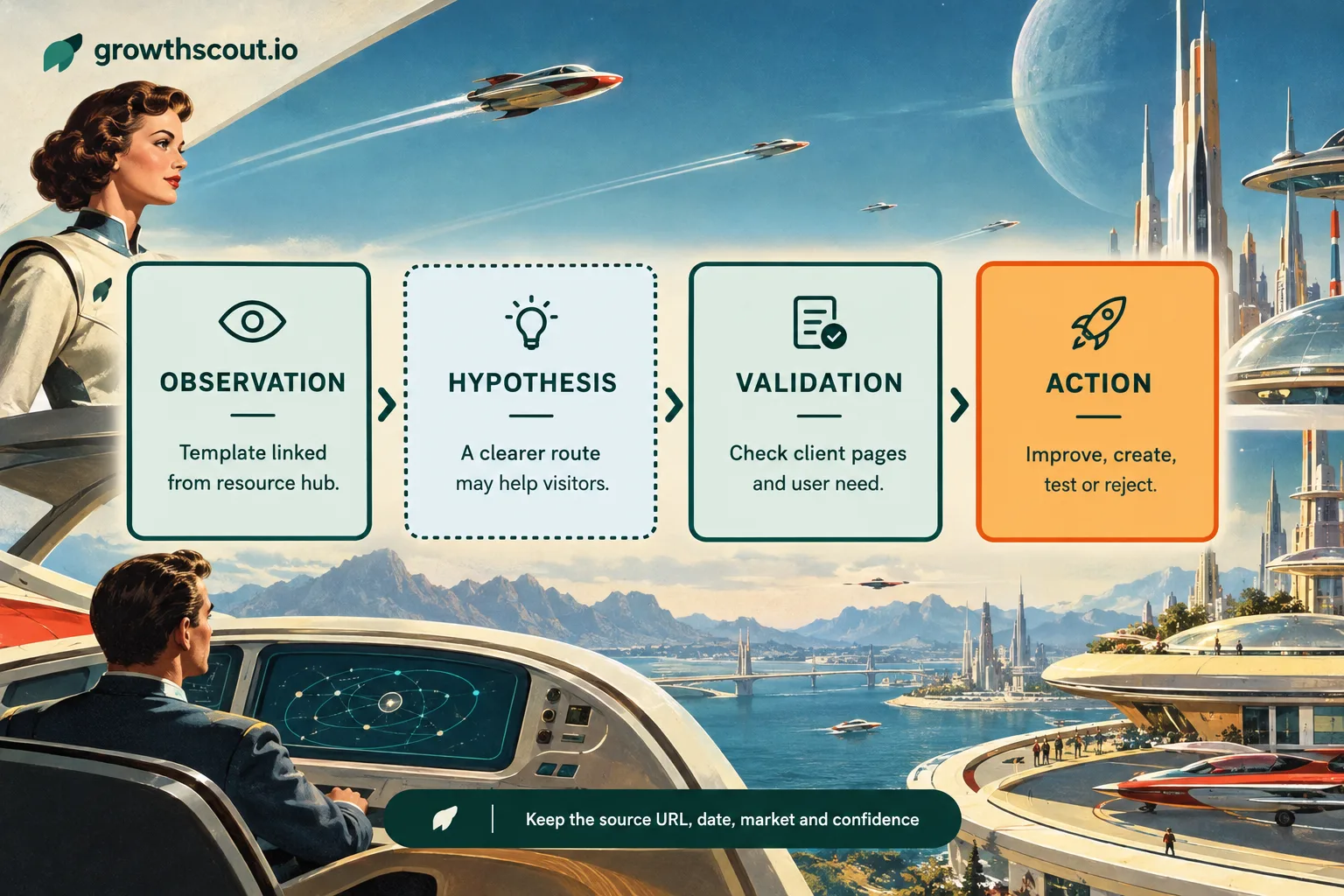
Carry the same distinction into the client comparison. An illustrative evidence ledger might look like this:
| Finding | What remains to check | Possible client action |
|---|---|---|
| Competitor hub links to a template | Does the client have an equivalent? | Improve discovery or brief a distinct resource |
| Publishers cite competitor research | Can the client provide original evidence? | Scope research, not copied outreach |
| Guide offers a clear product route | Is the client's next step unclear? | Review contextual links |
Your output: an evidence ledger where another team member can open the source, understand the limitation and reproduce the observation.
Use confidence to describe the recommendation, not just the source. We can be confident a link exists while remaining uncertain about its commercial effect. If a recommendation depends on an unknown, specify the next validation task and defer the larger commitment.
8. Prioritise client actions and define verification
Compare surviving findings with the client's constraints: product capability, expertise, existing coverage, development capacity and commercial priorities. The strongest competitor pattern is irrelevant if it serves the wrong buyer.
Choose an action: improve a page, strengthen an internal path, create a distinct asset, investigate further or reject. Require a reason before creating another URL.
For our payroll example, we might prioritise an existing migration guide lacking a usable checklist and relevant product link. Updating it could be a better first project than commissioning overlapping migration articles. This remains a proposed experiment, not a promised outcome.
Sequence work using four judgements:
- Business relevance: does it serve a priority buyer or decision?
- Evidence confidence: is the problem confirmed on the client site?
- Potential usefulness: what improves for the reader?
- Effort and dependencies: who contributes, and what could block delivery?
Assign an owner, destination URL, completion condition and verification method. A vague instruction to improve migration content is not ready. Adding a specialist-reviewed checklist to the existing guide and verifying relevant internal links is buildable.
Check implementation first, then performance. Confirm that the intended page and links are live. Track relevant query and page trends, plus qualified outcomes where analytics supports them. Google recommends impressions and clicks rather than position alone, and cautions that a page change cannot automatically be credited for an improvement.
For multi-client delivery, we recommend monthly review of priority observations and a broader quarterly reassessment, adjusted for launches and material changes. Store dated snapshots rather than silently replacing evidence. If results disappoint, revisit the original assumption before copying another feature.
Agency handoff checklist
A completed assessment should leave the next team member with:
- A scoped objective and dated client baseline.
- Competitors with reasons for inclusion.
- A sampled map of important page types and internal paths.
- A relevant visibility shortlist and inspected content examples.
- Backlink observations supported by actual referring pages.
- Explicit limitations, confidence labels and unresolved questions.
- An action queue with owners, dependencies and verification checks.
Keep raw exports attached as evidence, not as the executive recommendation. Explain the few decisions that matter, including opportunities rejected and why. The analysis remains useful when it concludes that the client should improve existing assets rather than publish more.
Before handing over, ask a colleague to trace one recommendation back to its source and forward to its completion condition. If they cannot explain why the task matters or how to verify delivery, clarify the brief before assigning production. This small quality check helps keep interpretation attached to the evidence across multiple client teams.
Put one validated improvement into production
Choose one high-confidence finding and turn it into a brief or implementation task. Keep the evidence attached, identify the reader benefit and decide how to verify the change before work begins.
At Scout, we keep each added website's business context, opportunities, content plan and settings separate. Agencies can review and edit articles before publication; additional website capacity requires a separate paid checkout. Explore Scout's agency workflow to connect research with planning and editorial delivery without losing each client's context.
Sources
- Google: Performance report common tasks
- Google: Link best practices
- Ahrefs: Organic traffic methodology
- Google: Creating helpful, reliable, people-first content
- Google: Links report
- Google: Link-spam policies
- Scout: Agency workflow