
TL;DR
To review an article for SEO, check the answer before polishing the keywords. Confirm that the draft serves the intended reader, verify important claims, replace generic advice with usable examples, then review headings, metadata, links and images. Finish with a publishing preview and a clear approval decision. Fix unsupported claims and missing answers before treating the article as ready.
A draft can contain the right keyword, polished sentences and several citations while still leaving its reader unsure what to do. Article writing for SEO needs an editorial standard that goes beyond whether a phrase appears in the document.
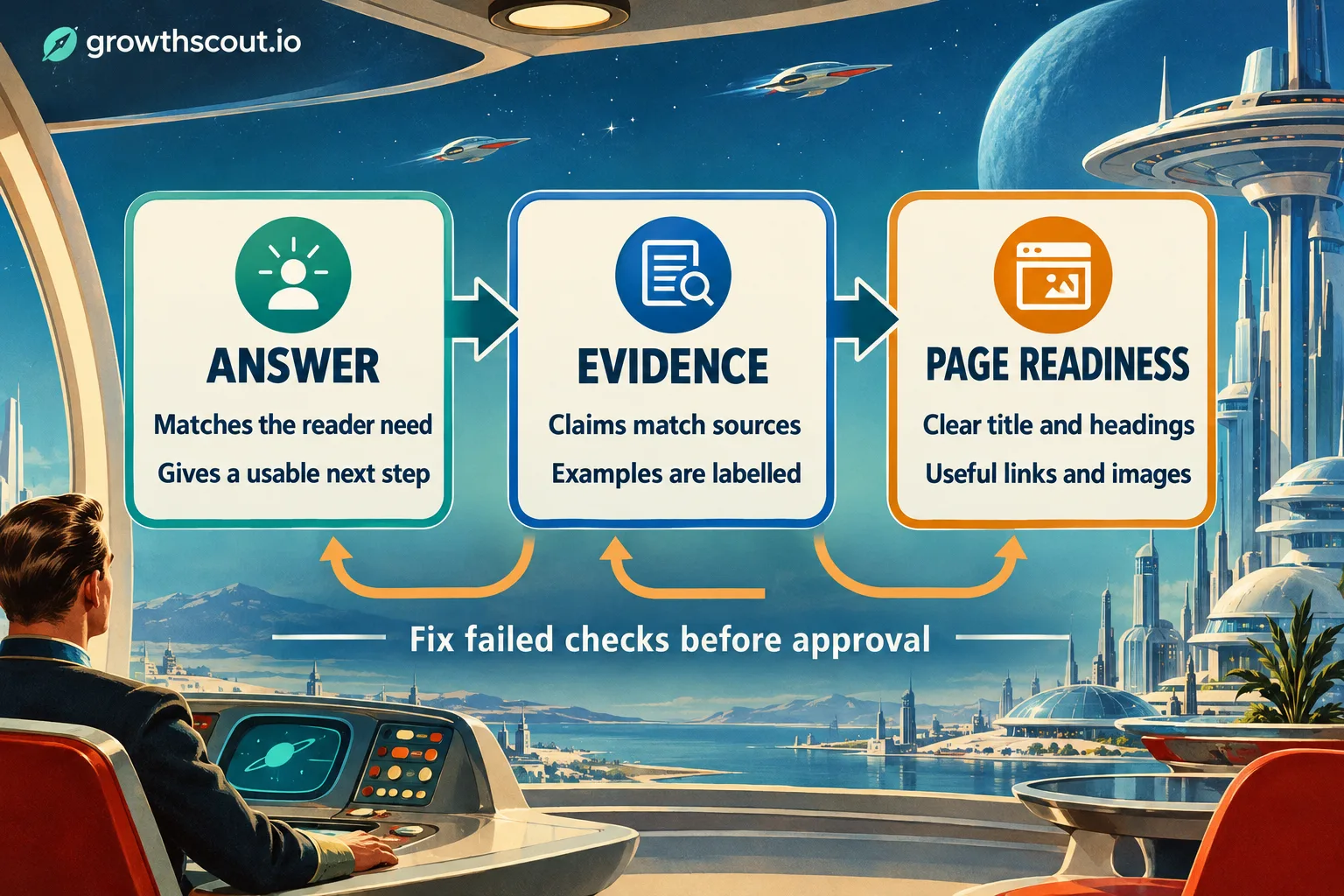
We recommend reviewing in three passes: answer, evidence and page readiness. This guide turns those passes into eight testable steps for marketing teams reviewing an existing draft. It is not another tutorial for starting from a blank page.
The outcome is a marked-up article and a short revision list, with a clear decision: approve, revise or hold for verification.
Table of contents
- Before you begin: collect the draft and review inputs
- 1. Confirm the reader's question and search need
- 2. Read the opening, headings and ending as one argument
- 3. Verify consequential claims against their actual sources
- 4. Replace generic advice with an example readers can use
- 5. Review topic coverage without forcing keywords
- 6. Align the title and description with the finished article
- 7. Inspect links and image descriptions for usefulness
- 8. Preview the page and record an approval decision
- A reusable final approval checklist
- Turn the review into a repeatable publishing standard
- Sources
- Recommended Reads
Before you begin: collect the draft and review inputs
Have these ready:
- The draft, its brief, focus keyword and intended reader.
- Source links, approved business facts and permissions for any customer examples.
- Access to existing website content and a publishing preview.
- A named factual reviewer and someone authorised to approve publication.
You can review the copy without CMS permissions, but someone must check the actual page before release. If specialist advice falls outside your competence, assign that review rather than assuming editorial approval covers it.
Keep comments in one review document. Label each issue answer, evidence or page readiness, and give it an owner. Resolve failed checks before approval; do not average them into a reassuring content score.
1. Confirm the reader's question and search need
Write the article's promise in one sentence: “Help [reader] do [task] so they can [outcome].” Compare that promise with the draft, not just its keyword.
For a hypothetical article about SEO content calendars, the promise might be: “Help a marketing manager turn approved article ideas into an owned, reviewable monthly schedule.” A draft describing only the benefits of consistent publishing would not complete that task.
Check a representative selection of search results for the intended market. Are readers being offered instructions, comparisons, definitions or services? Open relevant pages to understand their answers. Result titles suggest a format; they do not prove what a page actually covers.
Use the results to challenge your assumptions, not to copy an outline. Our guide to how keywords and prompts work together explains why similar wording does not necessarily mean the same customer need.
Pass check: a colleague can identify the intended reader, question and promised outcome from the draft. This aligns with Google's people-first content questions, including whether readers learn enough to achieve their goal.
If the promise and draft disagree, narrow the promise or revise the substance. Adding the keyword to more headings will not repair that mismatch.
2. Read the opening, headings and ending as one argument
Temporarily ignore the paragraphs between headings. Read only the title, opening, section headings and ending. They should form a coherent route from question to completed outcome.
Mark three problems: an opening that delays the answer, headings that repeat each other, and an ending that asks for an action unrelated to the article.
For our calendar example, compare these openings:
Before: “In today's competitive digital landscape, content calendars are essential for businesses seeking to succeed online.”
After: “Build your SEO content calendar around approved topics, owners, review stages and publishing dates. Start with the work your team can actually complete, then schedule each article backwards from its intended release.”
The second version gives the reader a method to inspect. It does not claim that scheduling alone improves rankings.
Next, replace vague headings such as “Important considerations” with the decision they explain, such as “Assign a factual reviewer before setting the publishing date.” Move prerequisite information ahead of instructions that depend on it.
Pass check: someone scanning the headings can explain the sequence without your commentary. The ending should identify the completed artifact and next useful action, not introduce an entirely new project.
If the sequence still feels confusing, rearrange or combine sections before editing individual sentences. Shorter sentences cannot rescue an argument in the wrong order.
3. Verify consequential claims against their actual sources
Highlight anything a reader might rely on: statistics, product capabilities, prices, comparisons, dates and strong claims about results. Open the source behind each statement and compare its exact wording, scope and conditions.
We recommend a compact evidence log:
| Draft statement | What to inspect | Editorial decision |
|---|---|---|
| “This method doubles organic traffic” | Original evidence, baseline, timeframe and applicability | Remove unless the evidence supports that promise |
| “The plan includes unlimited articles” | Published product terms and relevant limits | Correct to the verified allowance |
| “This example shows a customer result” | Actual records and permission to publish | Verify, or replace with a clearly hypothetical example |
A citation is not a pass by itself. A source about large ecommerce sites may not support a claim about every small business. A survey response is not automatically evidence of measured performance.
For AI-assisted drafts, check the source independently rather than asking the model to confirm its own answer. Google's generative AI guidance calls for manual fact-checking and review, including metadata and image alternatives.
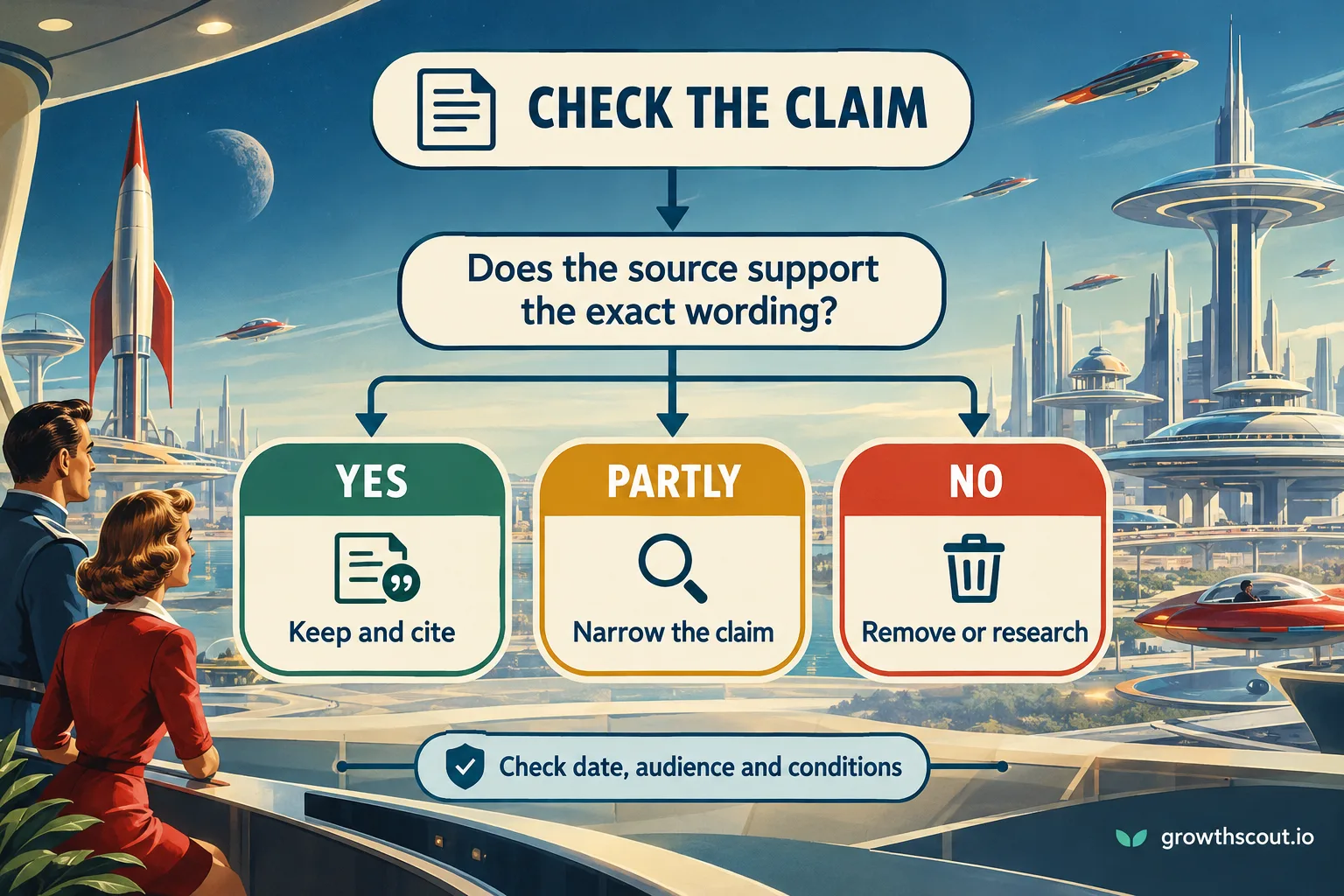
Pass check: the source supports the wording you will publish. Keep and cite supported claims, narrow partly supported claims, and remove or research unsupported ones. Check dates, audiences and conditions at each decision.
Do not leave a questionable promise in place because it sounds persuasive. If verification is unavailable, qualify or cut the claim. Treat unresolved business terms or specialist assertions as publication blockers, with a named reviewer.
4. Replace generic advice with an example readers can use
Find instructions that sound sensible but cannot be followed without more explanation. “Create quality content,” “optimise your strategy” and “use relevant keywords” all need a more specific action.
Our calendar draft might say:
Create a consistent schedule and collaborate with stakeholders to ensure quality.
An illustrative revision could say:
For each approved article, record the reader question, writer, factual reviewer, draft deadline and intended publishing date. Ask the reviewer to confirm availability before you commit the date. If the evidence is not ready, move the article back to research rather than pushing an unchecked draft into publication.
This is a hypothetical process recommendation, not a report of customer results. It gives the reader fields to create and a rule for handling a plausible failure.
Add the smallest example that closes the comprehension gap. That might be a rewritten opening, one completed calendar row, an annotated screenshot or a decision rule. Do not add an invented case study merely to make the article sound experienced.
Pass check: ask a colleague to carry out one instruction using only the draft. Note where they need to ask “Which information?” or “Who decides?” Those questions identify the missing detail.
If an example needs confidential information, obtain permission, anonymise appropriately or create a clearly labelled hypothetical alternative. Never present a constructed example as first-hand evidence.
5. Review topic coverage without forcing keywords
Now inspect the language around the main topic. Keep the focus phrase where it accurately identifies the article, and use related terms where they make the explanation clearer. Do not force an exact phrase into a sentence that no longer sounds natural.
For the calendar example, article ownership, review capacity and publishing dates belong because they help complete the scheduling task. A long detour into every available marketing channel probably does not.
Create a short list of questions the reader must resolve, then point to the paragraph that answers each one. Add missing explanations and remove sections that merely repeat an earlier answer. A keyword list can suggest questions to investigate; it should not become a mandatory list of headings.
There is no need to extend a complete answer to match a supposed search-engine length requirement. Google explicitly says it has no preferred word count.
Pass check: every section advances the promised outcome, and the draft remains clear when repeated keyword variations are removed.
If the article feels thin, add missing instructions, evidence or examples. If it feels bloated, cut detours and repeated summaries rather than shortening every paragraph indiscriminately.
6. Align the title and description with the finished article
Review metadata after the substantive edits. Otherwise, you may optimise a promise the final article no longer delivers.
Give the page a distinctive, descriptive title. Avoid stuffing it with near-identical phrases or promising a result the article cannot establish. Google's title guidance recommends concise, descriptive wording and a clearly identifiable main title.
For our illustrative draft:
- Vague title: “SEO Content Calendars: Everything You Need to Know.”
- More specific title: “How to Build an SEO Content Calendar Your Team Can Maintain.”
- Matching description: “Create a workable SEO content calendar with clear article owners, review stages and publishing dates. Includes a scheduling example and approval checks.”
Use that description only if the page actually provides those elements. Preview truncation on the publishing platform, but do not mistake a preview's character allowance for a universal ranking rule.
Google can generate title links from several sources. It also primarily creates snippets from page content, sometimes using the meta description. Your supplied wording is not a guaranteed search-result display.
Pass check: title, prominent heading, description and opening make compatible promises. If the title needs exaggerated language to sound appealing, improve the angle or useful detail instead.
7. Inspect links and image descriptions for usefulness
Open each link. Confirm the destination exists, matches the surrounding claim and gives the reader useful evidence or a sensible next step. Replace vague anchors with wording that accurately describes the destination.
For example, “our guide to assigning article reviewers” is more informative than “click here,” provided the linked page really covers that task. Do not invent an internal destination because the draft would benefit from one. Leave a clear editorial task if the resource still needs creating.
Google's link guidance recommends relevant, descriptive anchor text and contextual internal links. Choose links for their purpose, not a target count.
Give each visual a job: demonstrate an interface, explain a relationship or clarify a decision. If a screenshot is presented as evidence of a real feature, confirm it shows the relevant product and version. Clearly distinguish conceptual illustrations from actual interface captures.
For informative images, write alternative text conveying the relevant meaning. For complex graphics, keep the essential information available in the page text. Purely decorative images generally need an empty alternative, as explained by W3C's image-alternative decision tree.
Pass check: readers can understand the instructions without relying solely on the images, and every link opens the destination its wording promises.
If an infographic contains instructions absent from the body, add an equivalent explanation. Do not use image descriptions as another place to repeat the focus keyword.
8. Preview the page and record an approval decision
Run the final edit in the publishing preview, not only in the writing document. Check the mobile layout, heading order, tables, image placement, working citations and call to action. Confirm that the approved version, rather than an earlier draft, reached the CMS.
Then read for meaning. Remove repetitive section endings, unnecessary jargon and transitions that imply a conclusion the evidence does not support. Preserve useful qualifications when tightening sentences.
Assign one of three decisions:
- Approve: the promised answer is complete, material claims are checked and the page is ready for release.
- Revise: the direction is sound, but specific content or presentation changes remain.
- Hold for verification: an unresolved claim, permission or specialist review prevents approval.
We recommend treating a missing answer or unsupported consequential claim as a blocker. A minor wording preference should not carry the same weight. Separate those issues so the writer knows what must change first.
Pass check: the handoff names the draft version, decision, remaining actions and approval owner. Replace “needs work” with an instruction such as “Remove the unsupported traffic promise and add a completed scheduling example.”
After release, have the publisher open the public page and check the key links and layout again. Approval completes the editorial task; it does not prove indexing, rankings or commercial results.
A reusable final approval checklist
Copy this into the article's review ticket:
- One reader question and a clear completed outcome.
- Opening answers promptly; headings form a usable sequence.
- Important claims match their sources and qualifications.
- Examples are actionable, with hypothetical material clearly labelled.
- Missing answers are filled; repetition and irrelevant sections are removed.
- Title and description accurately represent the finished page.
- Links work; visuals have a purpose and appropriate alternatives.
- Publishing preview is checked and approval has a named owner.
Do not turn the checklist into a percentage that hides unresolved risks. Record the failed item, required change and responsible person. The useful output is a decision someone else can inspect.
Turn the review into a repeatable publishing standard
Take one draft already in your queue and run these checks. Finish with either an approved article or a short, prioritised revision brief. That is a more useful outcome than another document labelled “almost final.”
For teams connecting this work to ongoing production, explore GrowthScout's research-to-publishing workflow. We connect website context, opportunity research, planning and article preparation, with the option to review and edit before publication. Keep automatic publishing switched off when you want to approve every article first.
Sources
- Google Search Central: Creating helpful, reliable, people-first content
- Google Search Central: Guidance on using generative AI content
- Google Search Central: Influencing title links
- Google Search Central: Control snippets in search results
- Google Search Central: Link best practices
- W3C WAI: An alt Decision Tree
- GrowthScout: How keywords and prompts work together
- GrowthScout: Content workflow and review controls
Recommended Reads
- SEO Article Writing: A Step-by-Step Process for Marketing Teams, for the upstream research, briefing and drafting workflow.
- AI SEO Content: How Marketing Teams Can Scale Quality Without Losing Trust, for assigning automation and human responsibilities.
- Website Content Analysis: How to Find SEO Gaps and Improve Existing Pages, for extending a single-draft review into a site-wide assessment.