
TL;DR
To analyse competing websites, select relevant search competitors, compare visibility using consistent data, inspect their content and site structure, and investigate backlink sources. Then validate the strongest findings against search results and your own pages. We recommend finishing with three actions, each supported by evidence, an owner and a measurable outcome, rather than a large export of competitor keywords.
If you are looking for a competitor analysis website, start with the decision you need to make. A traffic-intelligence platform, an SEO research suite and a website crawler answer different questions.
The useful outcome is not knowing everything about a rival. It is understanding what your team should investigate, improve or build next.
In this guide, we combine tool selection with a seven-step workflow covering organic visibility, site structure, content and backlinks. Our central rule is simple: keep what you observed separate from what a tool estimated and what you still need to prove.
Table of contents
- What you need before you start
- 1. Define the decision and create an evidence record
- 2. Identify organic competitors, not just sales rivals
- 3. Choose tools and benchmark the right visibility
- 4. Map page roles and inspect the content behind them
- 5. Investigate backlinks at the source-page level
- 6. Validate findings and select three actions
- 7. Assign work and establish the next review
- FAQ
- Turn the findings into scheduled work
- Sources
- Recommended Reads
What you need before you start
Prepare:
- One commercially relevant topic or product area to investigate.
- A target country, language and device context.
- Your important existing URLs and authorised access to your own search-performance data.
- A browser and spreadsheet or planning workspace.
- Optionally, an SEO research suite, traffic-intelligence platform or crawler.
Use public competitor pages and permitted research tools. Do not bypass authentication or access restrictions. For crawling, respect the site's rules and use a restrained request rate; switch to manual sampling if access is blocked.
For the first pass, we recommend one topic area and three to five competitors. Expand only when the initial findings suggest a useful question.
1. Define the decision and create an evidence record
Write a brief that names the audience, scope and decision. For example:
Determine whether an employee-onboarding software company should improve its existing guide, create a practical checklist, or strengthen the links between its resources and product pages.
This illustrative brief makes several outcomes legitimate. The answer might be a new asset, but it could equally be a better existing page or no change.
Create a record for each finding with these fields:
- Competitor and exact page URL.
- Observation date and target market.
- Source or report, including its scope and filters.
- Finding and evidence type.
- Proposed explanation and next validation check.
Use three evidence labels:
Observed: You opened a page and found a downloadable checklist linked from a topic hub.
Estimated: A research tool models organic traffic for that page.
Hypothesis: A checklist could help your audience complete a task your current guide does not resolve.

Keep all three, but do not give them the same status. A visible checklist proves that the asset exists, not that it generates qualified leads.
Before continuing, check that your brief describes a decision. If it only says “understand competitors”, narrow the question until the answer could change a specific piece of work.
2. Identify organic competitors, not just sales rivals
Search a small set of representative, non-branded queries. Include different customer tasks: learning the process, finding a resource and evaluating a solution.
For our onboarding example, the set might include “employee onboarding process”, “new starter checklist” and “employee onboarding software”. Record the domains and individual pages that appear repeatedly.
Separate the comparison set into:
- Business competitors: organisations selling an alternative to your offer.
- Search competitors: sites appearing for the queries you want to serve.
- Content references: publishers or specialists with useful examples, even if they are poor whole-domain benchmarks.
Do not assume that a publisher ranking for a checklist is a sales rival. Equally, do not omit it from a content-format review simply because it sells something different.
We recommend retaining three to five sites with a clear reason for each inclusion. Compare a relevant resource section or individual page when a whole domain covers many unrelated subjects.
Verification check: Open several ranking pages per candidate. Confirm that their audience, task and geographic relevance match your brief, rather than relying on the result title alone.
If the competitor list changes completely between queries, you may have combined different intents. Keep separate comparison sets for educational and commercial searches instead of forcing them into one benchmark.
3. Choose tools and benchmark the right visibility
Choose the smallest toolset that can answer your question. Start with manual inspection; add a specialist data source when you need information that the page itself cannot show.
| Starting point | Question it helps answer | Main limitation |
|---|---|---|
| Google Search Console | Which queries and pages generate clicks and impressions for your own site? | It is your performance baseline, not a public competitor-analytics database. |
| Semrush organic traffic estimates | What search traffic might a competitor's rankings generate? | The figures are modelled from search volume, rankings and estimated click-through rates, not direct visit counts. |
| Ahrefs Site Explorer | What organic rankings and backlink evidence can we investigate at domain, section or page level? | The selected search scope changes the reports and metrics you see. |
| Similarweb | What broader website-traffic patterns should we investigate? | Its methodology combines multiple signals and modelling; do not treat a competitor figure as an audited analytics total. |
| Screaming Frog SEO Spider | How are accessible pages, titles, headings and internal links organised? | A crawl describes what it discovers, not which pages generate revenue. |
For an organic-growth review, begin with search results, your own baseline and one SEO data source. Add broader traffic intelligence if channel context matters, or a crawler if site organisation is unclear.
Record the same market, date range and domain scope wherever the tool supports them. Compare competitors and your own domain within the same report. Do not place a competitor's estimated total visits beside your Search Console clicks and call the difference a performance gap.
Even one suite may contain different models. Semrush explains that estimates can differ between Organic Rankings 2.0 and other reports. Preserve the report name when recording a baseline.
Build a shortlist of relevant ranking pages and topics, not just a league table of domain totals. When a topic merits detailed keyword extraction and mapping, continue with our keyword gap analysis workflow.
If a tool returns little data, check scope and market settings. Mark missing figures as unknown rather than zero, then continue with direct page inspection.
4. Map page roles and inspect the content behind them
Now examine how the competitor serves the reader across pages. Start with navigation, relevant resource hubs and the URLs in your visibility shortlist. Use a permitted crawl when manual inspection becomes unwieldy.
Screaming Frog documents support for analysing titles, headings, internal links, crawl depth and site-architecture visualisations. These help organise the investigation, but you still need to read the important pages.
For each sampled page, record its role: explanation, comparison, checklist, template, tool, product evaluation or customer support. Follow the links a reader would naturally use next.
In our fictional onboarding example, a hub could connect a process guide, an operational checklist and a product page. The analytical question is whether each page resolves a distinct task and offers a useful next step.
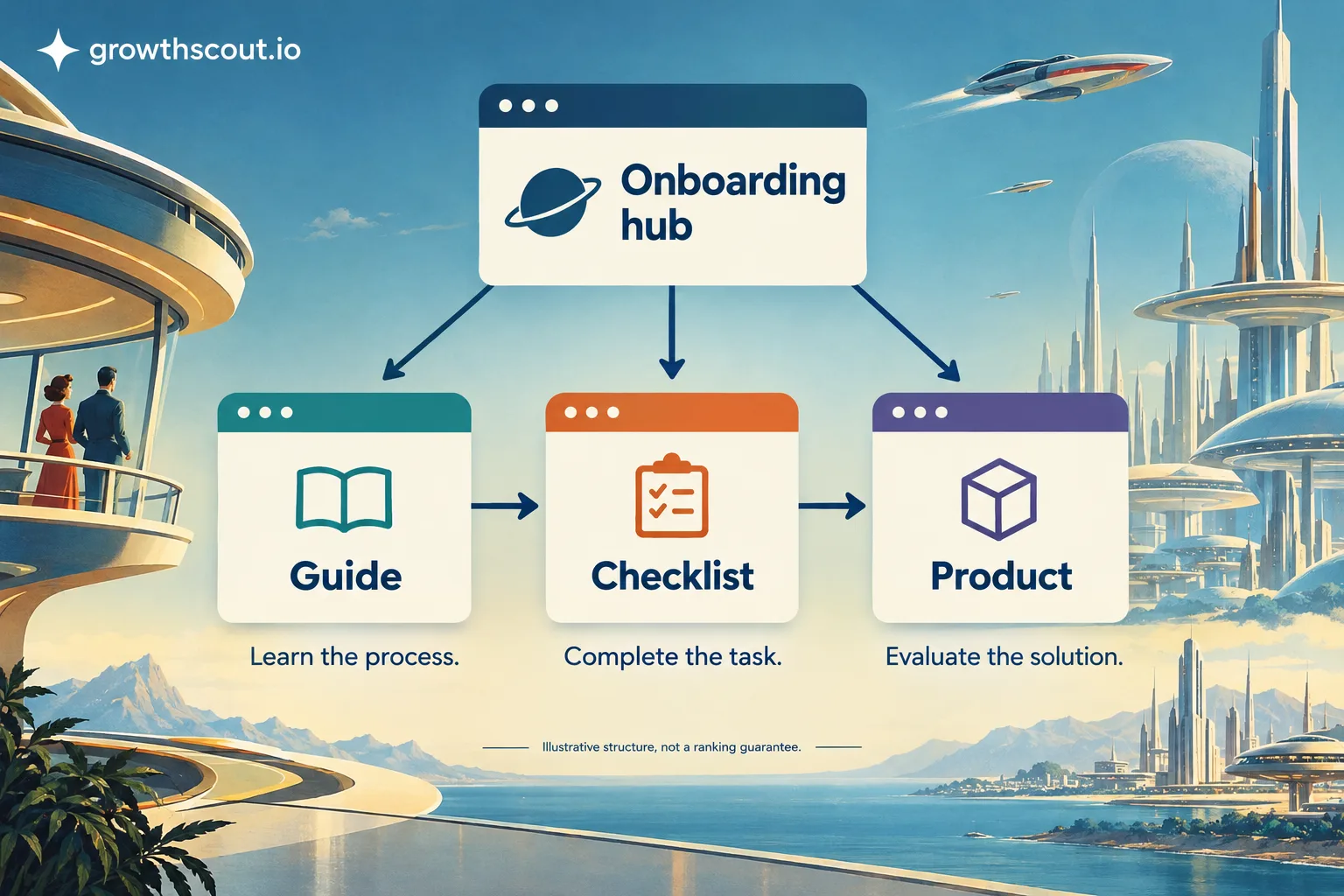
Read a manageable sample across the page types that matter. We suggest checking:
- Immediate usefulness: Does the page answer the main question promptly?
- Practical support: Are there usable examples, instructions, templates or decision criteria?
- Evidence: Are claims supported by credible sources or demonstrable experience?
- Completeness: What important constraints or follow-up questions remain unresolved?
- Reader journey: Is the next link relevant to the task, rather than merely promotional?
Record specific differences. “Competitor has better content” is not actionable. “Their checklist assigns a responsible person to each onboarding task; our guide lists tasks without ownership” gives your reviewer something to evaluate.
Do not infer conversion performance from a polished layout or prominent call to action. You can observe the journey, not its commercial results.
If a crawl looks incomplete, inspect a few missing pages manually before judging the site's coverage. Access restrictions, rendering and crawl limits can leave gaps in the inventory. Likewise, a discovered URL is not proof of Google indexing or ranking.
5. Investigate backlinks at the source-page level
Use backlink research to ask what other websites found worth referencing, not simply how many links a competitor has.
Start with pages relevant to your topic. Inspect the linking pages and record the source domain, destination, surrounding context, asset type and whether the link is still present.
A comparison can help narrow the list. Ahrefs Link Intersect identifies sites linking to competitors but not to you. Treat the output as a set of leads for investigation, not a ready-made outreach list.
For each promising source, ask:
- Does this publication reach our intended audience?
- Why does this particular page reference the competitor?
- Is the link editorial, sponsored, a partnership reference or something else?
- Could we provide something independently useful to that reader?
Suppose a specialist HR publication cites an onboarding survey. The useful finding may be demand for original evidence, not an opportunity to request a link to your generic software homepage.
Choose an appropriate response: create a genuinely useful resource, contribute relevant expertise, investigate a legitimate partnership, or reject the lead.
Avoid reproducing questionable tactics simply because a ranking competitor uses them. Google's link-spam policies cover buying links for ranking purposes and excessive link exchanges. Paid advertising or sponsorship links should be appropriately qualified.
If the original link cannot be verified, retain that uncertainty. A database entry alone does not establish that the link is live, editorial or beneficial.
6. Validate findings and select three actions
Bring the visibility, content, structure and backlink findings together. A recommendation should survive three checks before entering production.
Check audience and search intent
Revisit the search results for the proposed topic. Open representative pages and identify the reader's task and the formats serving it. Record the date and search context rather than treating one result set as permanent.
If the task is to complete a checklist, another broad definition article may not be the right response. If results serve several distinct needs, decide which one your business can credibly address.
Check your existing coverage
Read your closest existing page and review the relevant page/query data. Decide whether the finding calls for an update, a new destination, better internal links, deeper research or no action.
Use our website content analysis guide when this turns into a broader assessment of your own inventory. Do not commission a new article solely because an exact phrase is absent from your titles.
Check differentiation and feasibility
Explain what you can contribute beyond another version of the competitor page. Google's people-first content guidance emphasises originality and substantial added value, not simply rewriting existing sources.
Then check whether the required expertise, data, design or development capacity is available.
For the illustrative onboarding investigation, the decision record could look like this:
| Finding | What remains unproven | Next action |
|---|---|---|
| Several sampled pages provide reusable checklists; ours explains the process only. | Whether our audience needs a separate downloadable asset. | Validate the task with customer-facing colleagues and review the live results before briefing a checklist. |
| The competitor's hub links directly to relevant supporting resources. | Whether changing our links would improve discovery or engagement. | Inspect our own hub and add genuinely useful missing paths. |
| An HR publication cites a competitor's original survey. | Whether we have credible evidence that would interest its readers. | Assess a research idea before starting outreach. |
We prioritise business relevance first, then evidence confidence and delivery feasibility. “High potential, low confidence” belongs in research, not automatically at the top of the publishing queue.
7. Assign work and establish the next review
Finish with three approved actions. Each should name the affected page or asset, supporting evidence, owner, dependency, delivery date and success signal.
For an existing-page update, record a baseline for the relevant query group and landing page. For a new resource, define the audience task it must resolve and the appropriate next action. For a backlink investigation, begin with verified relevant sources rather than a volume target for outreach.
Use your own performance data to evaluate your changes. Search Console's Performance report includes clicks, impressions, CTR and average position, with dimensions such as queries, pages, countries and devices.
We recommend checking implementation after release, reviewing priority topics monthly and revisiting the broader competitor set quarterly. These are working cadences, not promises about how quickly rankings will change.
When performance shifts, investigate the affected pages and queries before attributing the result to your change. Compare equivalent periods and note other releases, seasonal influences or changes in query mix.
If impressions increase but business outcomes do not, revisit audience fit and the next-step journey. If there is little relevant visibility, inspect discoverability, indexing and intent alignment before commissioning more content.
FAQ
Which competitor analysis website should we use?
Choose around the missing information. We would start with an SEO research suite for rankings and backlinks, traffic intelligence for broader traffic patterns, or a crawler for page structure. Manual inspection remains necessary to assess usefulness and relevance.
Can we analyse competitor websites for free?
Yes, for a limited first pass using public search results, manual page inspection and a spreadsheet. Screaming Frog's free version also supports up to 500 URLs per crawl, with restrictions on advanced features. Broader coverage may require paid tools.
Can these tools reveal exact competitor traffic or conversions?
Do not assume so. The traffic sources discussed here describe estimation or modelling methods, not unrestricted access to a competitor's analytics. A visible conversion path also does not reveal its conversion rate. Record estimates and observations separately.
Turn the findings into scheduled work
You have completed the analysis when your team can explain what it will change, why the evidence supports it and how the result will be assessed. The next useful action is to brief the strongest validated opportunity, not expand the spreadsheet.
At Scout, we connect website context, competitor research for planned articles, a prioritised 30-day calendar and article drafting in GrowthScout. You can keep automatic publishing off and review the work before it goes live.
If that is the handoff your team needs, start your 3-day free trial: 3 AI article drafts, then £74/month per website.
Sources
- Google: Search Console Performance report
- Semrush: How organic traffic is estimated
- Ahrefs: Introduction to Site Explorer
- Similarweb: How we measure digital traffic
- Screaming Frog: SEO Spider capabilities and limits
- Ahrefs: Link Intersect
- Google: Spam policies
- Google: Creating helpful, reliable, people-first content
- GrowthScout: Workflow and trial details