
TL;DR
SEO keyword research turns audience questions into a shortlist of search terms worth targeting. Start with a relevant business problem, expand your seed topics, check search intent, assess demand and competition, and inspect existing pages before prioritising. We recommend keeping evidence confidence separate from the priority score: an attractive keyword with missing data needs investigation, not an automatic publishing slot. Your finished shortlist should identify the reader, intended page, supporting evidence and next action for each opportunity.
SEO keyword research is the process of finding, assessing and prioritising the words people use when searching for information relevant to your business. The useful output is not the biggest keyword export. It is a defensible decision about which searches deserve your attention.
In this guide, we work through seven stages, from defining the research scope to reviewing a validated shortlist. We keep the method tool-agnostic and use a hypothetical reporting-software business to make the decisions concrete. You can apply the same approach to a service, ecommerce category or specialist content library.
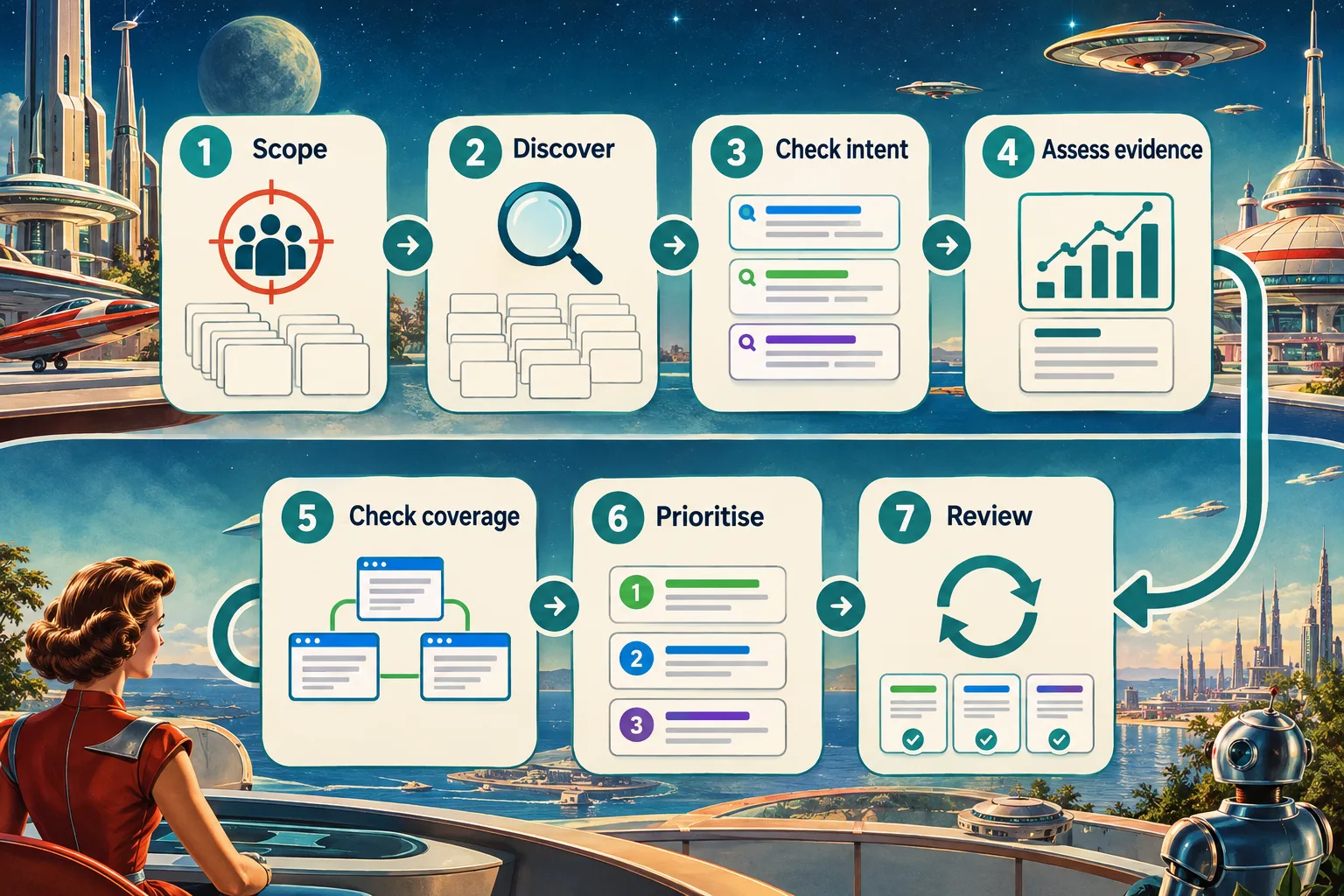
Table of contents
- Before you start: gather the inputs
- 1. Define the audience problem and seed topics
- 2. Expand seeds into relevant keyword candidates
- 3. Validate search intent against actual results
- 4. Assess demand, competition and business value together
- 5. Check existing coverage and assign a page direction
- 6. Score opportunities and select a manageable shortlist
- 7. Record the handoff and review the assumptions
- FAQ
- Turn the shortlist into your next decision
- Sources
- Recommended Reads
Before you start: gather the inputs
Prepare a shared worksheet and these inputs:
- Business context: your audience, relevant products or services, priority problems and a useful next action for the reader.
- Market settings: target country, language and, where relevant, device context.
- Customer language: sales questions, support themes, interviews and onsite searches you are permitted to review.
- Existing coverage: a list of published URLs with their titles, main headings and page purposes.
- Research access: public search results, a keyword data source and Google Search Console access if available.
- Decision ownership: someone who can approve the shortlist and challenge unsupported assumptions.
Search Console is useful for an established site, but it is not a prerequisite for discovery. If you choose Google Keyword Planner, Google requires account setup, including billing information, to access basic keyword discovery features.
Agree on the research question before gathering numbers. Otherwise, different team members can produce perfectly accurate exports that answer different questions.
1. Define the audience problem and seed topics
Start with one commercial area and one audience task. We find this easier to evaluate than a whole-business list assembled around broad industry vocabulary.
For our hypothetical reporting-software business, the scope could be:
Find UK searches used by agency account managers who need to prepare clearer client SEO reports.
Then build seeds from three perspectives:
| Perspective | Example seed | Why investigate it? |
|---|---|---|
| Customer task | Client SEO reporting | Describes the work the audience needs to complete |
| Recurring problem | Explain SEO results to clients | Captures a communication challenge |
| Desired resource | SEO report template | Suggests a practical asset the reader may expect |
These are starting hypotheses, not validated opportunities. Do not assume that internal product terminology is the language customers search with.
Ask a subject-matter expert to explain the problem without naming your product. Then compare that explanation with customer wording. A phrase such as “performance intelligence orchestration” may describe an internal category while “monthly SEO report” is the more useful seed to investigate.
Write an exclusion rule too. In this example, investor reporting and school reports are outside scope even though a tool might associate them with the word “reporting”.
Check before continuing: every seed has a named reader, a real task and a credible connection to your business. If that connection requires a long explanation, narrow or remove it.
2. Expand seeds into relevant keyword candidates
Use several discovery sources, but bring the results into one worksheet. Record where each candidate came from so the team can distinguish observed customer language from a tool suggestion.
Start with the evidence closest to the business
Review recurring questions from sales, support and onboarding. Preserve the original wording in your notes, then translate it into possible searches.
For example, “Clients keep asking what changed this month” could prompt research into “monthly SEO report”, “SEO reporting checklist” and “how to explain SEO results”. None becomes a target until it passes the later checks.
For an established website, inspect the Queries and Pages dimensions in the Search Console Performance report. They help connect searches with existing visibility and page performance.
Remember the limitation: Google omits anonymised queries and does not show every query row. Absence from the table does not establish absence of demand.
Expand with research tools and public results
Use your chosen tool to generate related terms and questions. Keyword Planner supports discovery from words or a website, which gives you two ways to explore the same subject.
Try modifiers deliberately:
- Task: create, automate, explain, improve.
- Resource: template, example, checklist.
- Audience: agency, client, marketing manager.
- Constraint: monthly, multi-client, without spreadsheets.
Search suggestions and questions in results can inspire candidates, but they are not measured search-volume evidence. Google specifically cautions that Autocomplete does not necessarily reflect the most popular searches.
Competitor pages can contribute ideas too. Keep that exercise bounded here; our keyword gap analysis guide covers the separate domain-comparison workflow.
At the end of this step, remove obvious duplicates and irrelevant meanings. Keep meaningful variants until you have checked whether they represent the same task. If the export is still unmanageable, narrow the seed topic rather than imposing an arbitrary volume cutoff immediately.
3. Validate search intent against actual results
Search intent is the job behind the query. We check it before scoring because demand has little value when the expected answer is something the business cannot provide.
For each promising candidate, inspect several representative organic results in the target market. Open the pages rather than relying only on their titles. Record the observation date and market context alongside:
- Page type: guide, product page, category, comparison, template or interactive tool.
- Reader task: understand, implement, compare, buy or navigate.
- Expected deliverable: an explanation, downloadable asset, working tool, examples or something else.
- Evidence standard: what expertise or original material would make your answer credible?
These are hypotheses to test, not claims about current rankings:
| Candidate | Possible reader expectation | What to verify |
|---|---|---|
| How to create an SEO report | A sequential explanation with examples | Whether guides dominate and what they help readers complete |
| SEO report template | A usable reporting asset | Whether a template is essential, rather than optional |
| SEO reporting software | A way to evaluate or obtain software | Whether commercial pages or comparisons best meet the task |
If results are mixed, document which intent your proposed page will serve. Do not combine incompatible tasks just because the phrases share words.
Search results vary with time, place, device and user context, as Google explains in its Performance report guidance. Treat your inspection as dated evidence, not a permanent verdict.
The exit test: write “The searcher needs ___, so our page must provide ___.” If the second blank names an asset you cannot produce, reject, defer or reframe the candidate.
4. Assess demand, competition and business value together
Now add numbers, keeping the source, market and observation date visible. We use metrics to compare plausible opportunities, not to rescue irrelevant ones.
| Signal | What it helps assess | What it does not establish |
|---|---|---|
| Monthly search volume | Approximate demand for the measured phrase or grouping | Unique people, expected visits or conversions |
| Organic keyword difficulty | A research tool's estimate of ranking competition | Your probability of ranking or a guaranteed result |
| CPC or advertising bids | Advertiser interest in paid search clicks | Revenue your organic page will earn |
| Search Console impressions | How often your site appeared for the selected view | Total market demand |
| Trend direction | Relative interest across time or locations | An absolute monthly search count |
Read volume and advertising metrics carefully
Google defines Keyword Planner's average monthly searches using the keyword and close variants, selected date range, location and Search Network settings. Its figures are rounded. Crucially, its Competition column describes advertisers, not organic ranking difficulty. See Google's historical metric definitions.
Keep those distinctions in your worksheet. An advertising-competition label of “Low” is not permission to mark organic difficulty as low. Likewise, a high CPC is a commercial clue to investigate, not a forecast of content returns.
Do not add the volumes of close variants and call the total a unique audience. Preserve each phrase's measurement and make the page decision separately.
Inspect the competition behind the difficulty score
Read the methodology for your chosen tool. For example, Ahrefs bases its Keyword Difficulty score on referring domains to top-ranking pages, while also recommending manual assessment rather than relying solely on the score.
Our review asks whether we can offer a more useful resource: clearer implementation detail, credible examples, specialist knowledge or an asset the current pages do not provide well. A longer article is not, by itself, that advantage.
Keep uncertainty visible
Use Google Trends to investigate seasonality or changing interest, but remember that its values are normalised on a 0-to-100 scale, not reported as search counts.
When data is missing, write “unknown”. When a tool reports zero, retain it as that tool's result, then examine customer evidence and related searches before deciding. Neither case should quietly become proof that nobody needs the answer.
Before moving on: give each surviving candidate a short evidence note explaining demand, likely effort and business relevance. If you can only repeat a volume number, the assessment is incomplete.
5. Check existing coverage and assign a page direction
Before proposing anything new, search your content inventory for the same reader task. Read promising pages in full, including their examples and intended next actions. An exact keyword missing from a title does not prove a content gap.
We use four provisional directions:
- Refresh: an existing page already serves the task but needs stronger evidence, coverage or presentation.
- Create: the task is distinct and no suitable destination appears among the pages reviewed.
- Review overlap: several pages appear to make the same promise and need closer assessment.
- Hold or reject: the topic lacks fit, evidence or a feasible response.
Record the existing URL wherever one is relevant. “Publish another blog post” should not be the default answer to every new phrase.
Close wording does not automatically mean separate pages, either. Google's SEO Starter Guide explains that its language systems can connect pages with related queries without every exact variation appearing. Group candidates by the task and expected answer, then use result overlap as supporting evidence.
If you need a broader inventory first, follow our website content analysis guide.
By this point, a candidate should have passed relevance, intent, evidence and coverage checks. The decision tree below brings those gates together before prioritisation.
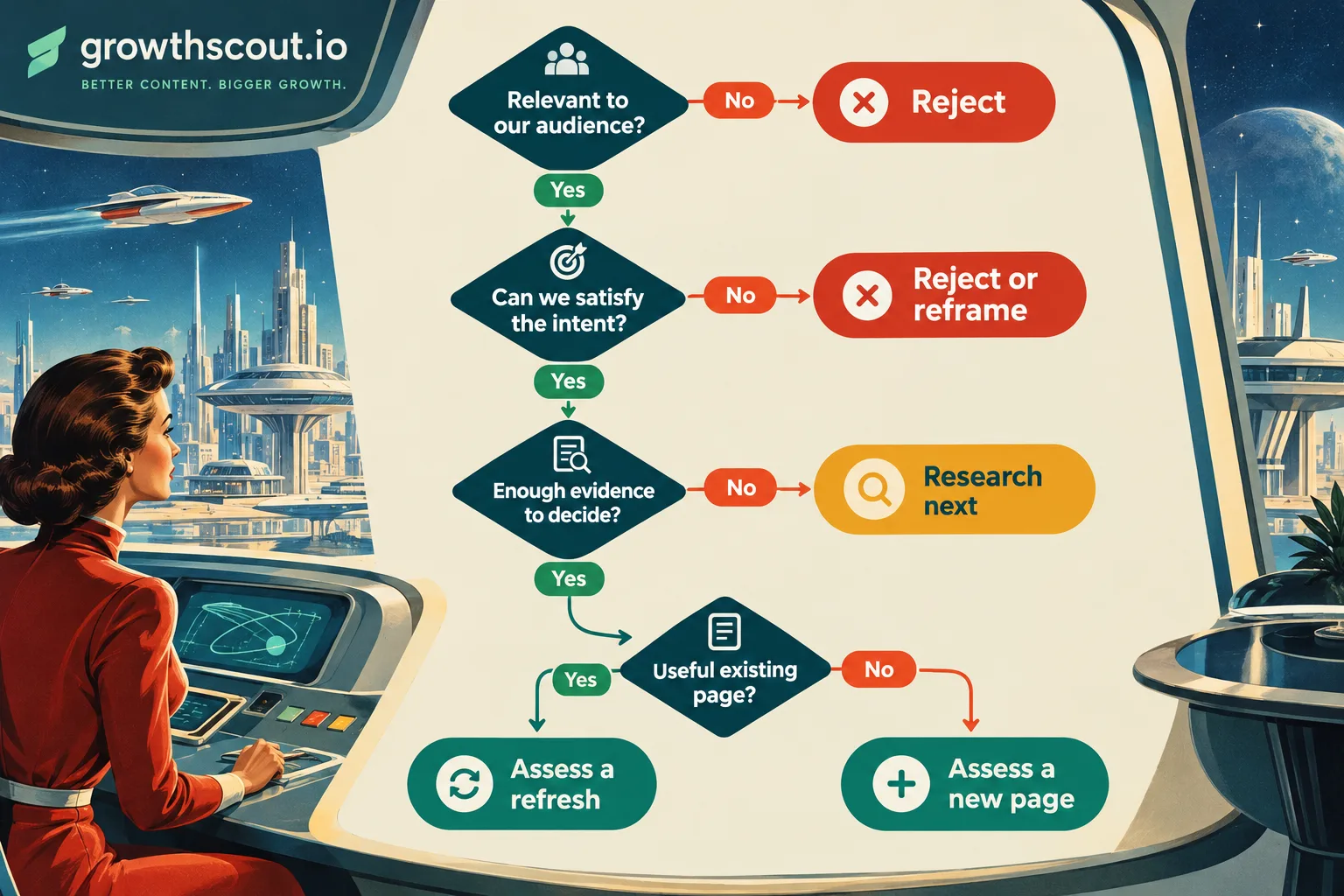
Verification: a second reviewer should be able to explain why the proposed destination is a refresh, a distinct new page or an unresolved overlap. If they cannot, keep the page direction provisional.
6. Score opportunities and select a manageable shortlist
Apply eligibility gates before arithmetic. Reject candidates outside your audience or capabilities even if their metrics look attractive. Put unresolved intent or missing evidence into a research queue.
For candidates ready to compare, we recommend a simple starting model:
Priority = (3 × business fit) + (2 × attainable usefulness) + demand evidence + content leverage − effort
Score each factor from 1 to 5 using definitions the team agrees in advance:
- Business fit: 1 means a weak connection; 5 means a direct connection to a priority audience problem and useful next action.
- Attainable usefulness: 1 means no clear advantage over the results reviewed; 5 means strong expertise and assets for a credibly better answer. This is an editorial judgement, not a ranking probability.
- Demand evidence: 1 means limited but credible evidence; 5 means strong evidence relative to other opportunities in the same market.
- Content leverage: 1 means an isolated resource; 5 means clear support for important existing pages, customer questions or sales conversations.
- Effort: 1 means a straightforward update; 5 means substantial research, design, development or review dependencies.
These weights are a proposed decision aid, not a validated forecasting model. Agree them once for the research batch so stakeholders cannot change the rules to favour individual topics.
Worked example: choose between three candidates
The following scores are entirely illustrative. They are not measured search volumes, difficulty scores or claims about current results.
Candidate A: “SEO report template”
Suppose the business has a useful template ready, a clear audience fit and reasonable demand evidence. Business fit 5, attainable usefulness 4, demand 3, leverage 4 and effort 2 produce:
(3 × 5) + (2 × 4) + 3 + 4 − 2 = 28
This would be a strong shortlist candidate, provided the expected template genuinely exists and passes review.
Candidate B: “SEO reporting”
Suppose this broader topic has strong demand but much tougher results and greater production needs. Scores of 5, 1, 5, 4 and 5 produce:
(3 × 5) + (2 × 1) + 5 + 4 − 5 = 21
It remains strategically relevant, but the narrower template can take priority. High demand has not been mistaken for an easy opportunity.
Candidate C: “automate SEO report approvals”
Suppose sales feedback suggests relevance, but demand and intent have not been checked. Leave the total blank and mark Research next. Assigning zero would conceal missing evidence inside an apparently complete score.
Keep confidence in a separate field: high, medium or low, with a reason. Then challenge the order. Would a small scoring change reverse the top two? If so, treat them as a similar priority and decide using dependencies or strategic timing rather than decimal precision.
Select only the number of opportunities the team can investigate or brief next. A shortlist is a commitment to decisions, not a second oversized backlog.
7. Record the handoff and review the assumptions
For every approved opportunity, preserve enough context that the next person does not have to reconstruct the research:
| Field | What to record |
|---|---|
| Keyword and variants | The main query and related terms serving the same task |
| Audience and intent | Who needs the page and what they must accomplish |
| Market and observation date | Where and when the evidence was gathered |
| Evidence | Sources, metrics, result observations and customer signals |
| Page direction | Existing URL to assess or a distinct new-page proposal |
| Priority and confidence | Score, assumptions and unresolved questions |
| Next action | Brief, refresh assessment, further research or rejection |
This is the handoff to content planning, not the entire publishing roadmap. Our SEO content planning guide covers turning approved opportunities into briefs, ownership and delivery dates.
We recommend reviewing the active shortlist monthly and revisiting discovery when products, customer needs or market conditions change. After publication or a substantial refresh, compare page and query impressions, clicks and CTR in Search Console, alongside the business outcomes your analytics can measure.
Final check: every active row has an owner and a next decision. If performance disappoints, revisit the original assumptions about intent, demand and page usefulness before generating more keywords.
FAQ
How do we research keywords for a new website without Search Console history?
Begin with customer questions, subject-matter interviews, relevant public results and a keyword research source. Inspect the pages already serving the audience and document where your proposed resource would add value. Mark confidence accordingly: without site performance history, you have less first-party evidence about which searches will connect with your pages.
Can we use AI to help with keyword research?
We recommend using AI for brainstorming, organising candidate lists and proposing questions to investigate. Keep those suggestions separate from verified evidence. A generated volume, difficulty score or claimed ranking without a traceable research source should remain unverified. The team should still approve relevance, intent, page direction and priority before anything reaches production.
Turn the shortlist into your next decision
Your completed research should let you explain why a few opportunities deserve attention now, which existing pages might serve them and what still needs investigation.
Start with the highest-confidence candidate. Confirm its evidence, approve the page direction and hand it to the person responsible for the brief or refresh assessment.
If you want to connect research with production, explore GrowthScout's research-to-publishing workflow. We connect website context, opportunity research and article planning. Keep automatic publishing switched off when your team needs to review each draft before publication.
Sources
- Google Ads: Use Keyword Planner
- Google Ads: Keyword Planner forecasts and historical metric definitions
- Google Search Console: Performance report overview
- Google Search Console: Query dimensions and limitations
- Google Trends: FAQ about the data
- Ahrefs: Keyword research and Keyword Difficulty methodology
- Google Search Central: SEO Starter Guide
- GrowthScout: Research, planning and review workflow