
TL;DR
Start with the pages that matter to your business, not every warning in an SEO report. Confirm those pages can be accessed and indexed, improve their search intent match and content, strengthen internal links, and fix meaningful mobile problems. Then ship a small, prioritised batch of changes and measure it against a baseline. Your first week should produce verified improvements and an owned backlog, not a promise of instant rankings.
Website SEO optimisation means improving how search engines understand your pages and how people find useful answers on them. Google’s SEO Starter Guide describes both sides of that job: helping search engines understand content and helping searchers decide whether to visit.
We recommend beginning with a manageable group of important pages. This guide takes you from choosing those pages to making specific changes and checking the outcome. It is an implementation process, not a tool comparison or a full technical audit.
Table of contents
- Before you start
- 1. Choose a business goal and your priority pages
- 2. Clear access blockers and set a sensible work order
- 3. Align the page with the searcher’s actual task
- 4. Improve the answer before adding more content
- 5. Give important pages useful internal paths
- 6. Fix mobile and technical problems that obstruct use
- 7. Ship a focused batch and measure what happens
- Your first-week SEO checklist
- FAQ
- Turn the first improvements into a working routine
- Sources
- Recommended Reads
Before you start
Have these inputs ready:
- Access to Google Search Console and your website analytics or enquiry records.
- Permission to edit page content, titles and internal links in your CMS.
- A developer or website administrator for changes to indexing controls, templates and performance.
- A list of priority services or products, audiences and target locations.
- A spreadsheet or task board, plus a backup or rollback route before publishing changes.
Give each task an owner, affected URL, evidence, proposed change and verification check. Keep recommendations separate from approved work. You can investigate with read access, but changing production settings requires the right permissions and a recovery plan.
1. Choose a business goal and your priority pages
Write one outcome that SEO should support. For a UK commercial cleaning company, an illustrative goal might be: “Increase qualified enquiries for recurring office cleaning in Leeds.” That is more useful than “improve our SEO score”.
Choose five to ten pages for the first pass. Include the relevant service page, a useful supporting guide and any page already attracting related searches. Do not automatically select the busiest blog posts if they serve a different audience.
For each page, record:
- The customer question or decision it should serve.
- Its role in reaching the business goal.
- Current search clicks, impressions, click-through rate and relevant query themes.
- Enquiries or other meaningful actions, where tracking exists.
Use Search Console’s Performance report for search metrics. Record completed enquiry forms separately in analytics or your lead system.
We suggest a recent four-week baseline, extended when activity is sparse. For a UK-focused business, review UK results separately and keep device and search-type settings consistent. Google documents how to filter and compare performance data.
Checkpoint: Every shortlisted page has a clear job and a baseline. If it has little data, mark the opportunity as uncertain rather than treating zero clicks as proof that the page is worthless.
2. Clear access blockers and set a sensible work order
Before rewriting a priority page, check whether Google can access it and whether it is indexed. Enter its complete URL into Search Console’s URL Inspection tool.
Review crawl access, indexing permission and the Google-selected canonical, meaning the version Google chose to represent equivalent content. If you recently changed the page, run a live test as well. Google’s URL Inspection documentation distinguishes indexed information from the live test: a successful live test does not establish that the page is indexed or guarantee a search appearance.
Investigate accidental blocks, unexpected indexing exclusions or an unsuitable canonical with your website administrator. Leave deliberately private and excluded pages alone. Do not remove indexing controls across the entire site just because one service page has a problem.
Then put the work into three queues:
- Now: Confirmed access blockers and broken essential journeys.
- Next: Well-supported improvements to important pages.
- Later: Uncertain ideas that need more evidence or substantial effort.
Within each queue, consider business benefit, confidence and effort. This is an implementation order, not a prediction of ranking gains.
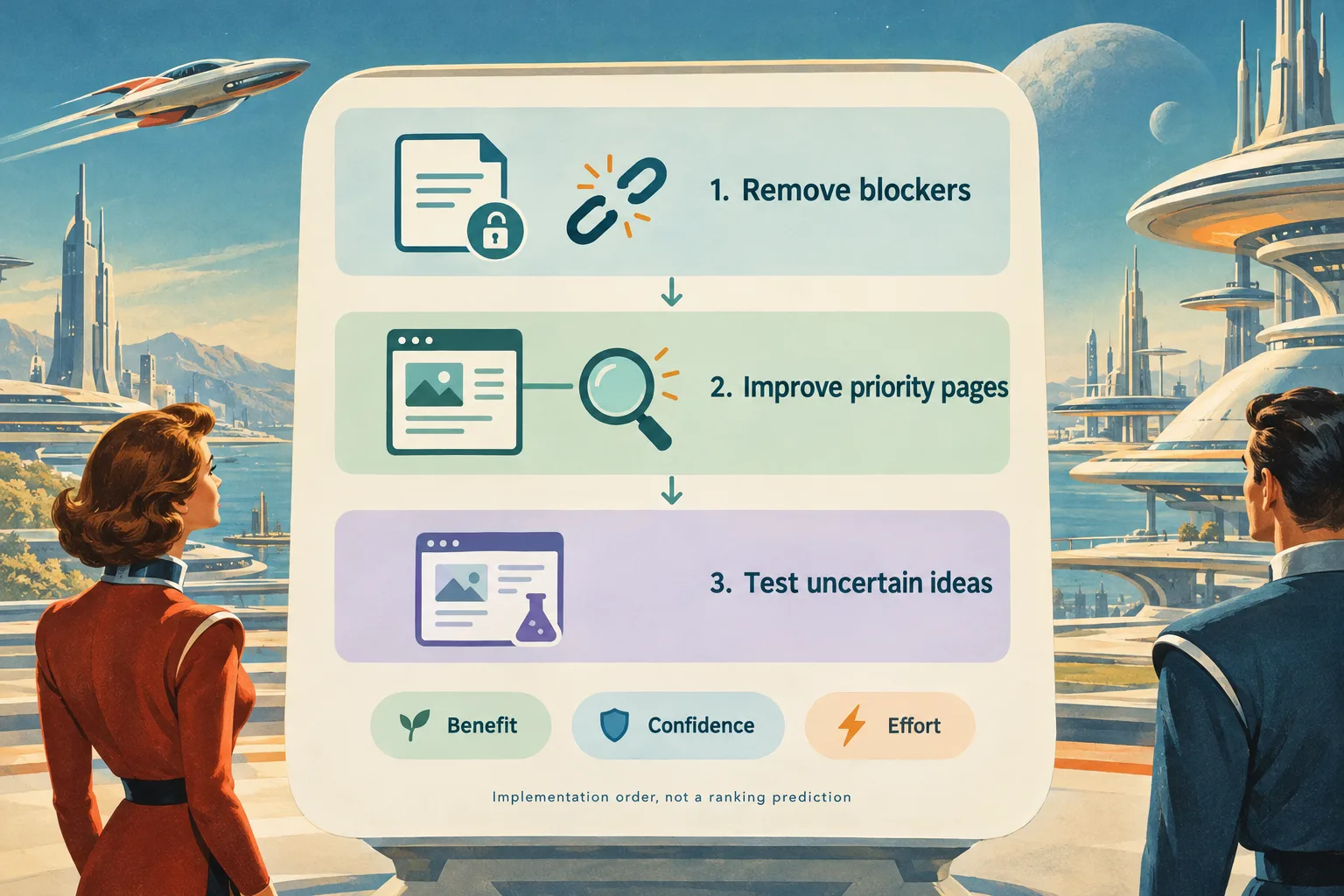
For example, an accidental indexing exclusion on a core service page deserves attention before a speculative rewrite of an unrelated archive post. A broken enquiry form is also urgent, even though repairing it is a conversion fix rather than a direct ranking tactic.
If the problem repeats across sections: Use our full-site SEO audit guide for systematic diagnosis. Do not turn a small implementation exercise into an undocumented sitewide repair.
3. Align the page with the searcher’s actual task
For each priority page, inspect relevant search results and ask what someone needs to accomplish. Are they trying to book a service, compare options or learn how to complete a task?
Use that decision to review the page title, main heading and opening content. Google recommends clear, concise, descriptive titles, and explains that search snippets can come from page content or the meta description. You can influence these elements, not dictate their exact appearance.
Here is an illustrative service-page edit:
| Element | Before | More useful direction |
|---|---|---|
| Page title | Services | Office Cleaning in Leeds: Scope and Enquiries | Example Cleaning |
| Main heading | Welcome to our services | Office cleaning for Leeds workplaces |
| Opening | We provide excellent solutions | Explain the workplaces served, service area, visit options and how to request a quote |
| Description | Generic copy repeated across pages | Summarise this page’s actual service and useful details |
Only include locations and service claims that the business can substantiate. A guide explaining how to choose a cleaning provider needs a different promise from a service page taking enquiries.
Check the published page, not just the CMS editor. Confirm that its visible heading, opening and title tell a consistent story. If the page tries to answer unrelated needs, clarify its main purpose before adding more keywords. Natural wording matters more than forcing every search variation into the copy.
4. Improve the answer before adding more content
Read the page as a prospective customer. What would you still need to know before acting?
For our illustrative cleaning service, useful additions could explain what a visit includes, who supplies consumables, access arrangements, exclusions and what happens after an enquiry. These are suggested questions to investigate, not claims to invent.
We would ask a service expert to check the answers and contribute a real example where available. Keep evidence close to claims and identify the reviewer where that helps readers assess credibility. Google’s people-first content guidance emphasises originality, substantial answers, accuracy and clear information about who created the content.
Choose the smallest justified action:
- Refresh an answer that is useful but incomplete or outdated.
- Keep separate pages that serve genuinely different decisions.
- Consider consolidation when pages substantially duplicate the same purpose.
- Create a new page only when an important need lacks a suitable existing destination.
If consolidation is appropriate, plan the destination, any relevant redirects and updated internal links before removing old content. Do not merge pages merely because their keywords look similar.
For a deeper assessment across your existing library, use our website content analysis guide.
Verification: Ask someone unfamiliar with the business to complete the page’s intended task. If they still cannot explain the offer or choose a next step, another paragraph of generic benefits is unlikely to solve the problem.
5. Give important pages useful internal paths
Check how visitors reach each priority page. Look beyond the main menu to related guides, service overviews, category pages and contextual references.
Google recommends that every page you care about receive a link from at least one other page on your site. Its link best practices also recommend descriptive, relevant anchor text and crawlable links.
A useful journey could connect a topic hub to a helpful guide, then to a relevant service page when the reader is ready. A detailed supporting answer can link back to the guide without forcing every visit directly towards an enquiry.
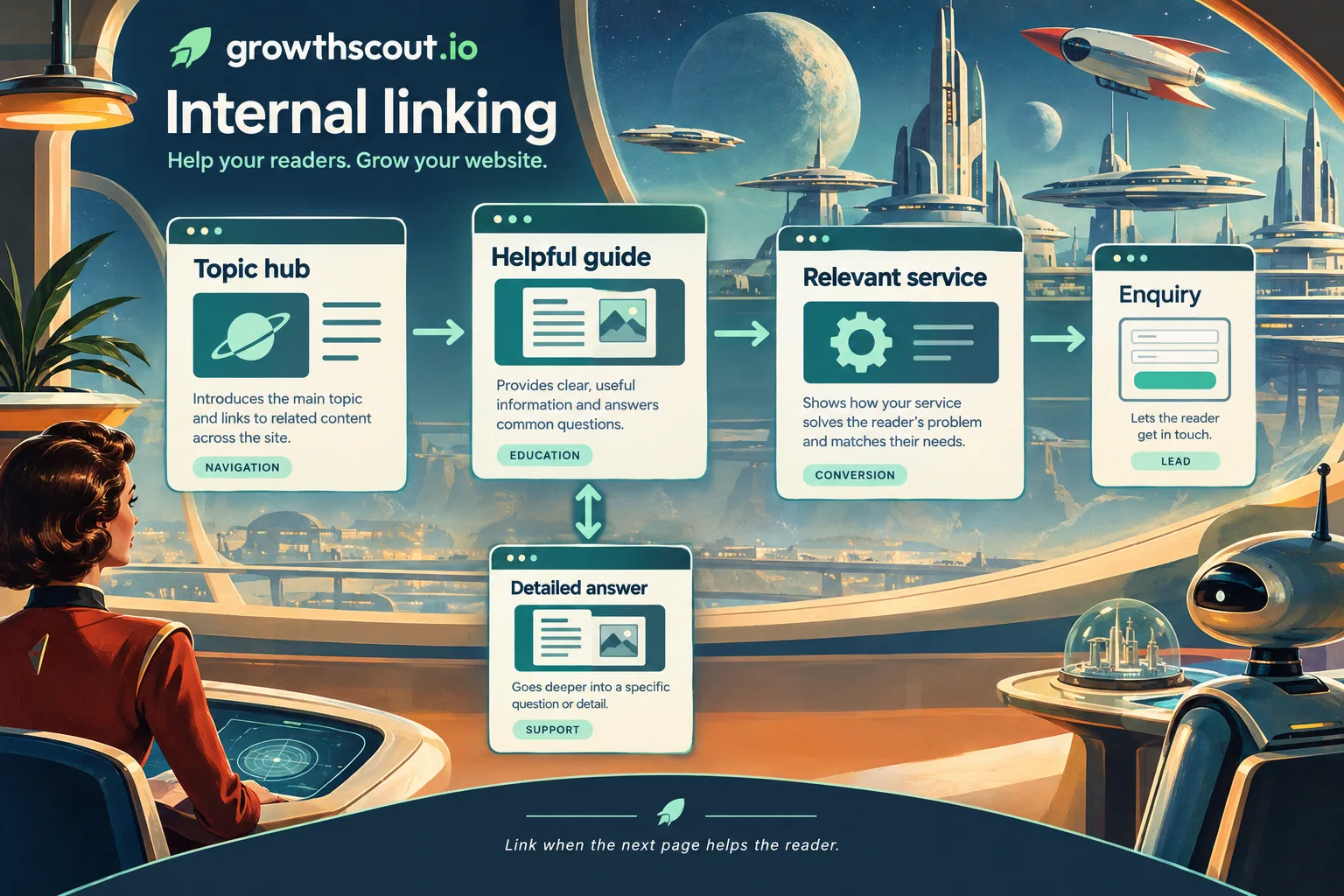
For the cleaning example, a guide to arranging workplace cleaning could link to the service page using “office cleaning options in Leeds”, provided the destination actually explains those options. That is clearer than an isolated “click here”.
Test every changed link on the published site. Confirm it reaches the intended destination and that its wording sets the right expectation.
If the destination cannot be discovered through normal browsing: Add a sensible route from an appropriate hub or related page. If your navigation relies on scripted interactions, ask a developer to check crawlability rather than assuming that a clickable control is a discoverable link.
6. Fix mobile and technical problems that obstruct use
Open representative priority pages on a phone. Can someone read the content, navigate, understand the offer and complete the form without fighting the layout?
Check that important information is available on mobile, not removed to simplify the design. Google uses the mobile version of content for indexing and ranking.
Test a service page, article and other important template with PageSpeed Insights. Its documentation distinguishes lab diagnostics from real-user data. Lab tests help investigate a problem; field data describes actual experiences. If page-level field data is missing, check whether the report is showing origin-level data before drawing conclusions.
For Core Web Vitals, Google’s Web Vitals guidance defines these good-experience targets at the 75th percentile, assessed separately for mobile and desktop:
| Metric | What it describes | Good target |
|---|---|---|
| Largest Contentful Paint | Main-content loading | 2.5 seconds or less |
| Interaction to Next Paint | Responsiveness | 200 milliseconds or less |
| Cumulative Layout Shift | Visual stability | 0.1 or less |
Give your developer a reproducible symptom and affected URLs, not just a red score. “The enquiry button moves while the page loads on these service pages” is a more actionable report than “make the site faster”.
Also review HTTPS, intrusive overlays and whether forms work. Good scores do not guarantee top rankings, and Google advises against chasing perfection solely for SEO.
Expected outcome: Verified user-facing problems improve without breaking essential functions. Repeat the same checks after deployment; a desktop lab improvement alone does not demonstrate a better mobile journey.
7. Ship a focused batch and measure what happens
Return to your backlog and update priorities using the evidence gathered. Fix confirmed blockers first, then approve a small batch of related page improvements that your team can review properly.
For every change, record the URL, publication date, owner, hypothesis and implementation check. For example: “Clarifying the service scope should make this page more useful for office-cleaning searches.” Keep that separate from the eventual outcome.
Review progress at three levels:
- Implementation: Is the intended change live, and does it work?
- Search visibility: Is the page indexed, and how are relevant queries, impressions and clicks developing?
- Business usefulness: Are visitors completing meaningful actions, with acceptable enquiry quality?
Compare equivalent periods using the same market and device settings. Search Console’s comparison guidance explains how to compare date ranges and warns that filtering can affect totals.
We suggest an implementation review immediately after release and a search-performance checkpoint after several weeks, extended for sparse data. Google says changes can take hours to several months to be reflected, and not every change produces a noticeable effect.
If impressions increase without clicks, inspect the queries and search-result presentation before rewriting again. If clicks increase without enquiries, check intent, the offer and the conversion path. If visibility stays flat, verify indexing and page relevance before assuming that more content is the answer.
Treat these as investigation routes, not automatic diagnoses. Seasonality, competition and other site changes can affect results. A before-and-after improvement is encouraging evidence, not proof that one edit caused it.
Your first-week SEO checklist
Use the week to complete one controlled improvement cycle, not to promise a ranking result.
| Day | Work to complete | Evidence to keep |
|---|---|---|
| Monday | Choose one goal and five to ten priority pages | Page shortlist and baseline |
| Tuesday | Check access and indexing; assign blockers | Inspection findings and owners |
| Wednesday | Review intent, titles and missing answers | Approved page edits |
| Thursday | Add useful internal paths and review mobile problems | Link checks and reproducible issues |
| Friday | Publish the approved batch and retest | Change log and next review date |
✅ If development work cannot finish this week, keep the dependency visible. The deliverable is a reliable queue and verified completed work, not a falsely “finished” site.
FAQ
What parts of website SEO should we automate?
We recommend automating repetitive evidence collection, task reminders and monitoring where your tools support them. Keep accountable review for factual claims, page consolidation and production changes. A tool finding is an input to a decision, not permission to delete or rewrite a page.
Do we need a paid SEO platform to start?
Not for this first pass. Use the access and tools listed above, plus a task sheet. Consider a broader platform when coordinating research, website context and publishing becomes the bottleneck, rather than buying one simply to collect another score.
Turn the first improvements into a working routine
You have completed the first cycle when your chosen changes are live, their implementation checks pass and the next measurement review has an owner and date. Pick the highest-confidence unresolved task next.
For help connecting research to a publishing plan, explore our Growth plan. It includes a website audit, keyword research and a 30-day content plan. Keep responsibility for technical repairs with the people who manage your website.
Sources
- Google: SEO Starter Guide
- Search Console: Performance report overview
- Search Console: Advanced filtering and comparison
- Search Console: URL Inspection tool
- Google: Creating helpful, reliable, people-first content
- Google: Link best practices
- Google: Mobile-first indexing best practices
- Google: About PageSpeed Insights
- web.dev: Web Vitals
- Google: Understanding page experience
- GrowthScout: Growth plan and workflow