
TL;DR
To prioritise an SEO audit, validate each finding against the client’s important pages, separate urgent harm from planned improvements, and compare ready tasks by impact, confidence and effort. Keep dependencies visible. Rank work within each website first, then allocate shared agency capacity around urgency, skills and client commitments. Every selected task needs an owner and a verification check.
An audit can identify hundreds of warnings without answering the agency’s hardest question: what should our team do next across these client accounts?
We separate that decision from running the audit. Our full site SEO audit guide covers gathering technical, content and link findings. Here, we turn completed audits into a defensible work queue across several websites.
The distinction matters. A technically serious finding is not automatically the highest business priority, and the client with the longest issue list should not automatically receive the next developer slot.
Table of contents
- Before you start: gather the decision inputs
- 1. Attach each finding to a client outcome
- 2. Route findings into four decision queues
- 3. Score ready work with a reusable triage matrix
- 4. Allocate shared capacity without creating a client leaderboard
- 5. Turn selected findings into executable tickets
- 6. Explain priorities and trade-offs to each client
- 7. Verify changes and reopen priorities when evidence changes
- FAQ
- Put the next planning session to work
- Sources
- Recommended Reads
Before you start: gather the decision inputs
Bring the following to the planning session:
- Dated audit findings with affected URLs, evidence and crawl scope.
- Each client’s priority pages, business objectives and agreed outcome measures.
- Authorised access to the relevant Search Console and analytics properties.
- Known launches, migrations, release freezes and approval requirements.
- Available developer, analyst and editorial capacity, plus agreed client commitments.
- A separate backlog for each website and a shared resource-planning view.
Read access supports triage. Implementation requires the appropriate permissions and approval; an audit recommendation is not permission to change a client’s site.
If key data is missing, record the gap. Do not silently treat an inaccessible analytics report or an untested template as evidence that nothing is wrong.
1. Attach each finding to a client outcome
Start with the website’s objective, not the crawler’s severity label. Identify the affected page group, its intended role and what the finding could prevent people or search engines from doing.
Severity describes the fault. Priority describes when this client should act, given its consequences and constraints.
For example, an indexing restriction deserves different treatment on current service pages than on intentionally excluded account pages. Google’s Page indexing report guidance explicitly says that not every URL should be indexed; important canonical pages are the concern.
Rewrite vague findings into decisions someone can assess:
Instead of “indexing errors”, write “an unintended restriction affects eight current service pages that support consultation enquiries”.
Record whether the connection to the business outcome is observed, inferred or still unknown. Historical enquiries may establish that a page matters, but they do not establish how many enquiries a repair will recover.
Your output is a finding tied to a specific client objective. If nobody can explain why the affected pages matter, ask the account owner before assigning a high impact score.
2. Route findings into four decision queues
Validate representative URLs and group repeated symptoms by their likely root cause. A shared template fault may justify one investigation rather than hundreds of tickets, but confirm that the examples really share a cause.
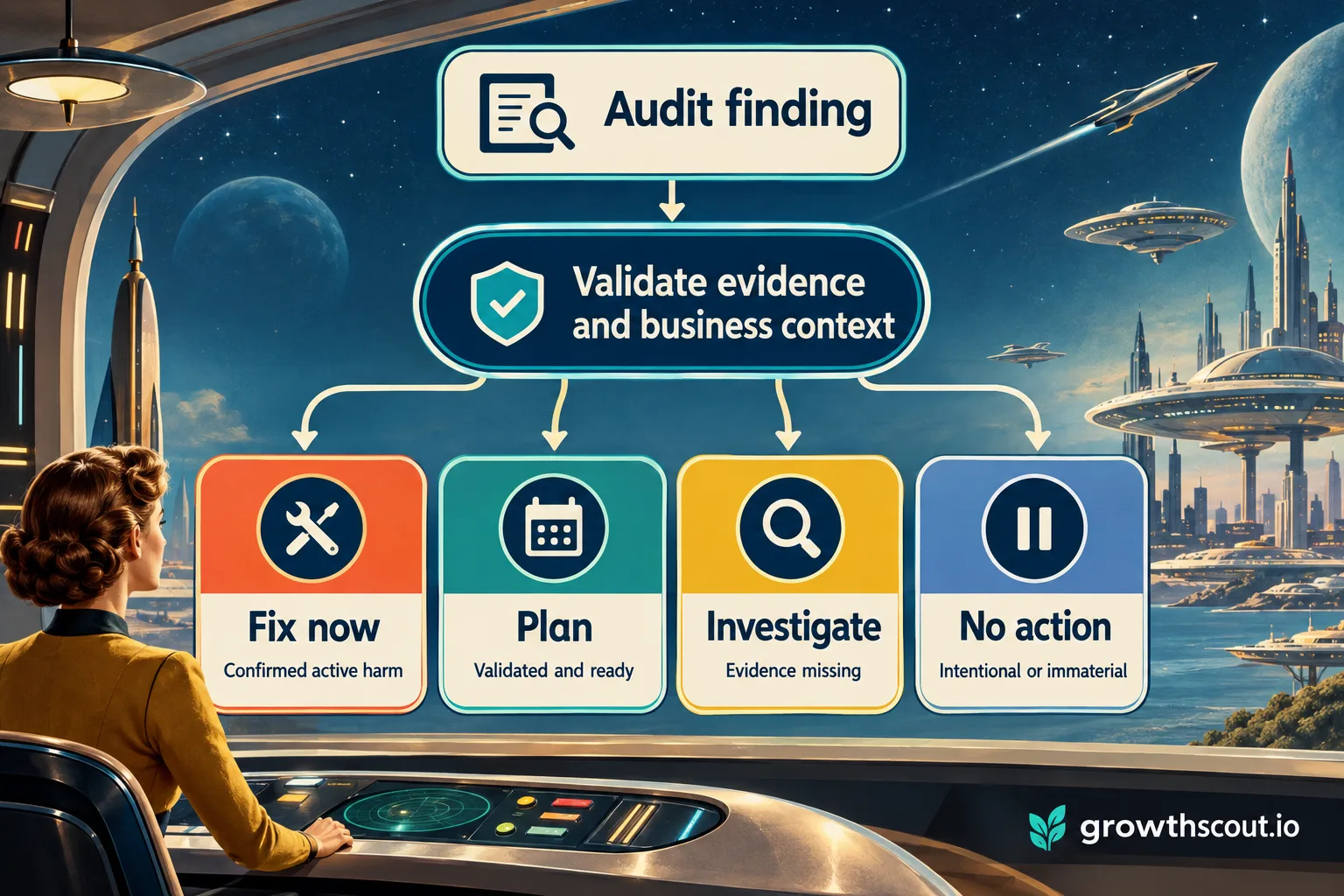
We recommend four destinations:
- Fix now: confirmed active harm affecting important pages or essential journeys. Escalate through the agreed incident process, with appropriate approval.
- Plan: a validated improvement with enough evidence, a defined action and no unresolved prerequisite preventing scheduling.
- Investigate: an uncertain diagnosis, missing evidence or a proposed remedy that has not been justified.
- No action: intentional behaviour, a false positive or a finding whose likely benefit does not justify intervention. Record the reason and any review trigger.
An uncertain but potentially serious incident still needs prompt investigation. “Investigate” must not become a low-priority holding pen when important pages may be unavailable.
Conversely, a low score alone is not an incident. For page experience specifically, Google says good report scores do not guarantee top rankings and chasing perfection purely for SEO may waste time.
Before moving on, every finding should have a disposition and a reason. If the live behaviour contradicts the audit, compare timestamps, URL variants and crawl settings before commissioning a fix.
3. Score ready work with a reusable triage matrix
After urgent issues have an escalation path, compare the remaining work within each client’s backlog. We use the following rubric as a planning aid, not a Google formula or a forecast.
| Dimension | What to record | Working scale or rule |
|---|---|---|
| Impact | Importance of affected pages and the problem being removed | 1: peripheral benefit; 3: meaningful improvement; 5: substantial effect on a critical journey or page group |
| Confidence | Evidence supporting the diagnosis and proposed action | 1: unverified suggestion; 3: partial validation; 5: reproduced cause with a well-supported remedy |
| Effort | Investigation, implementation, review and verification work | 1: up to half a day; 3: roughly one to two days; 5: substantial multi-team work |
| Urgency | Active harm or a genuine time constraint | Escalate now, fixed deadline, or routine planning |
| Dependencies | What must happen before work can start or finish | Name the prerequisite, its owner and release condition |
Use 2 and 4 for intermediate scoring cases. Calibrate the anchors with your team and replace rough effort bands with estimates before committing capacity. Confidence concerns the diagnosis and action, not certainty of ranking gains.
For ready, non-urgent tasks, a useful comparison is:
Priority score = impact × confidence ÷ effort
Suppose one client has two validated opportunities. Repairing a broken internal route to an important service page scores 4 × 5 ÷ 1 = 20. Updating unclear service eligibility information scores 4 × 4 ÷ 2 = 8. The first is the stronger starting candidate under these hypothetical assessments.
That does not prove a larger traffic return. It makes the assumptions inspectable.
Keep deployment risk outside the arithmetic as an approval gate. A broad redirect change should not become a casual quick win because its implementation looks short. Likewise, if a high-value task depends on an unresolved template repair, schedule the prerequisite first.
When everything scores highly, challenge the evidence and page importance. When an expensive remedy has weak evidence, estimate a smaller diagnostic task rather than approving the whole repair.
4. Allocate shared capacity without creating a client leaderboard
Now bring the top candidates from each website into the agency resource view. Do not sort every client’s score into one global list. A “5” for a small lead-generation site and a “5” for a large retailer reflect different objectives, baselines and commitments.
Use this order of discussion:
- Confirm active incidents and unavoidable deadlines.
- Honour agreed client commitments or explicitly renegotiate them.
- Identify the specialist capacity and approvals each task needs.
- Select ready work within each account’s allocation.
- Record which work is deferred and what would change that decision.
Consider this hypothetical planning session:
| Client | Leading finding | Allocation decision | Why |
|---|---|---|---|
| A | Confirmed unintended indexing restriction on current service pages | Give the available developer day to repair and verification | Active harm on important pages warrants escalation |
| B | An approved service-page update is ready | Use available editorial capacity in parallel | The work does not require the same developer |
| C | A shared performance fault is suspected, but its cause is unknown | Allocate one analyst hour to diagnosis | Evidence is needed before reserving a larger development slot |
| D | Alternate URLs are excluded as intended | Record no action | The reported exclusion is not a defect to remove |
These allocations are examples, not standard repair times. The task, access and release process determine the real estimate.
The useful comparison is which justified work can this team safely deliver now? Raw issue counts cannot answer that question.
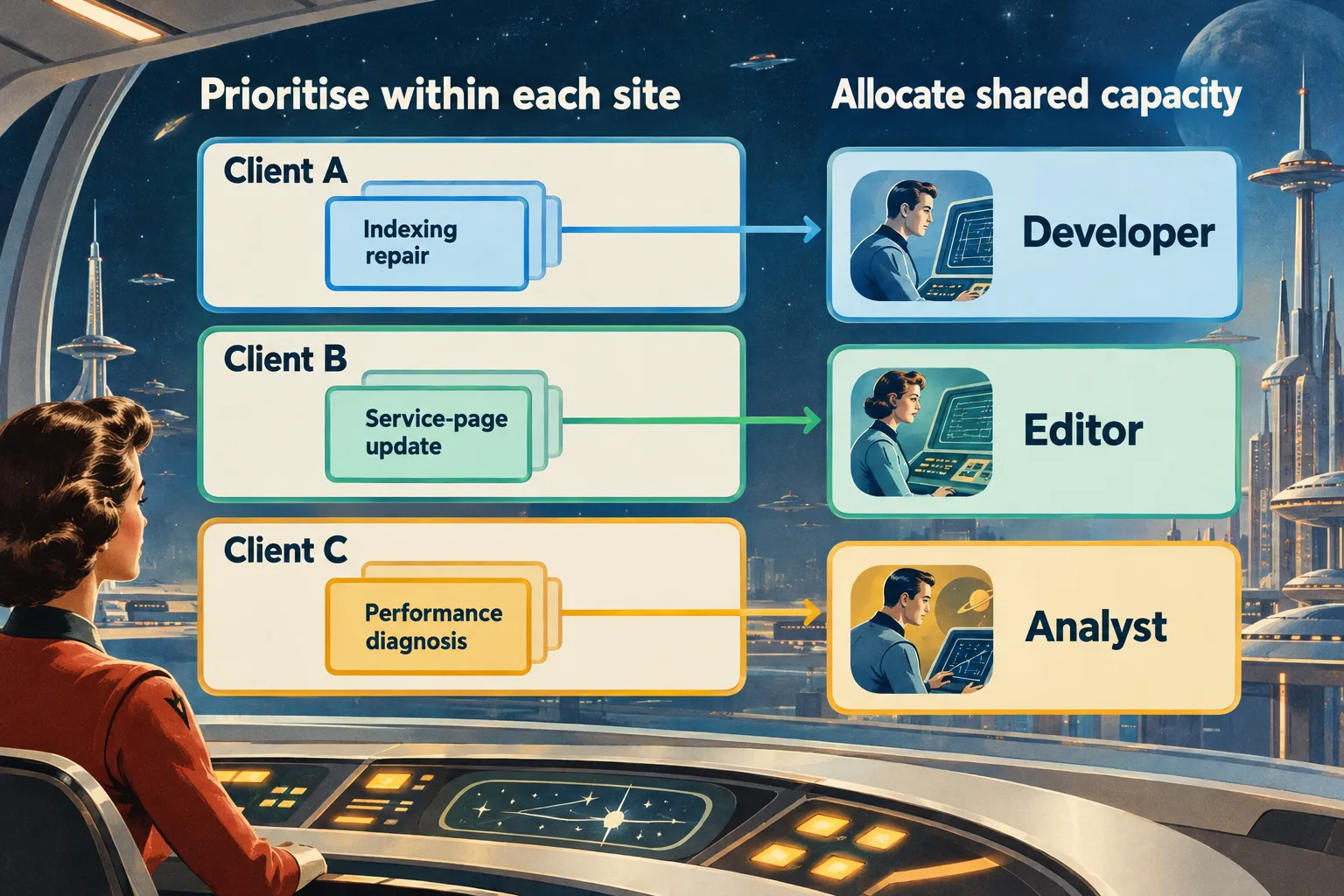
If two clients need the same specialist, make the trade-off explicit. Obtain account-owner approval for changed commitments, seek additional authorised capacity where appropriate, and avoid quietly starving a smaller account because another site has more URLs.
5. Turn selected findings into executable tickets
A priority is not scheduled work until someone can own and verify it. Attach enough context that the implementer does not need to reconstruct the audit.
For each selected task, record:
- Client, domain and scope: affected URLs or template, plus intentional exceptions.
- Evidence: dated observations and steps or checks that reproduce the finding.
- Decision: disposition, impact rationale, confidence, effort and urgency.
- Action and dependency: what should change and what must happen first.
- People: implementer, approver, verifier and escalation contact.
- Delivery: agreed date, release requirements and rollback responsibility.
- Acceptance test: observable implementation conditions and regression checks.
- Follow-up: baseline, outcome measure and next review date.
For Client A, acceptance might require confirming that affected service pages no longer carry the unintended restriction, while account pages retain their intended exclusions. Check representative URLs across the affected template, not just the first example.
Use precise status labels such as implemented, implementation verified and awaiting search observation. Do not close a ticket as “SEO improved” merely because the developer shipped it.
Google’s URL Inspection documentation distinguishes indexed information from a live test. A live test can assess current accessibility and potential indexability, but cannot predict Google’s canonical selection or guarantee indexing.
If the team cannot agree on a completion test, the diagnosis or scope probably needs clarification before implementation begins.
6. Explain priorities and trade-offs to each client
Show clients a short decision list, not a merged export from every tool. For each priority, explain the evidence, business relevance, proposed action, effort, dependency and what will wait.
A useful explanation could read:
We recommend correcting the unintended restriction on your current service pages before refreshing archive descriptions. We reproduced the restriction on the affected template. The developer will implement the approved change, and we will verify the intended behaviour before monitoring indexing and search performance. We cannot promise a ranking or enquiry increase from this repair.
That is an illustrative client message, not a reported result.
Include the trade-off: which other task moves, whether the work fits the agreed allocation, and who must approve a scope change. A repair outside the current engagement still needs an accountable destination, even if another supplier will implement it.
Separate evidence from expectation. “The restriction has been removed” is an implementation statement. “This should restore eligibility for affected pages” is a hypothesis to verify. “Traffic will rise next month” is not justified by the repair alone.
Before scheduling, obtain a recorded decision on consequential trade-offs. Silence in a meeting is not a reliable approval record.
7. Verify changes and reopen priorities when evidence changes
Check implementation promptly after release, including intentional exclusions and unaffected templates. Then evaluate search and business outcomes against the baseline, using a review period appropriate to the site’s traffic and seasonality.
Search Console’s Performance report provides clicks, impressions, CTR and average position, with dimensions including pages, queries, countries and devices. Keep the relevant property and filters consistent when comparing periods.
Those measures are not interchangeable with enquiries or purchases. Google explains that Search Console describes search activity while Analytics describes on-site interactions. Use the client’s agreed analytics or CRM definitions for business outcomes.
We recommend a weekly agency review of incidents, blocked dependencies and near-term capacity, with a fuller priority review during client planning. Reopen a decision sooner when:
- A launch, migration or template change alters the affected pages.
- New evidence confirms or disproves the diagnosis.
- Business priorities or specialist availability change.
- A completed prerequisite makes valuable work ready.
- Verification reveals a regression or incomplete repair.
Do not rewrite the whole backlog because one daily metric moved. Record the evidence that changed the decision. Your completed output is a current, explainable queue for each client, plus a realistic agency delivery plan.
FAQ
What if the client will not approve a high-priority repair?
Record the recommendation, evidence, approval decision and consequence of leaving it unresolved. Keep a named owner and a review trigger. Offer a smaller investigation or a safely scoped alternative where one exists, but do not mark a declined repair as completed or deploy without permission.
Who breaks a tie when two clients need the same developer urgently?
Escalate to the agency lead and the relevant account owners. Compare confirmed harm, time sensitivity, available alternatives and existing commitments. Agree additional capacity or a revised sequence, and tell affected clients what changed. A numerical score should support that discussion, not replace accountability.
Put the next planning session to work
Choose one audit finding from each active client and run it through this framework. Finish with an approved disposition, a named owner and a verification method, then check whether your shared team can deliver the commitments.
If the chosen work includes content updates, explore Scout’s agency content workflow. Each added website keeps separate context, plans and settings; additional website capacity is purchased separately. Keep technical repair tickets, staffing decisions and client approvals in your established systems.
Sources
- GrowthScout: How to Run a Full Site SEO Audit
- Google Search Console: Page indexing report
- Google Search Central: Understanding page experience
- Google Search Console: URL Inspection tool
- Google Search Console: Performance report overview
- Google Search Central: Using Search Console and Analytics data for SEO
- GrowthScout for agencies: Website-specific content workflows
Recommended Reads
- Multi-Client SEO: An Operating System for Managing Multiple Websites, for keeping client context, access and delivery separate.
- SEO Website Analysis: How to Prioritise What to Fix, for deeper diagnostic triage within one website.
- Automated SEO Strategy: From Site Audit to Measurable Improvement, for connecting audit priorities to a broader operating cycle.